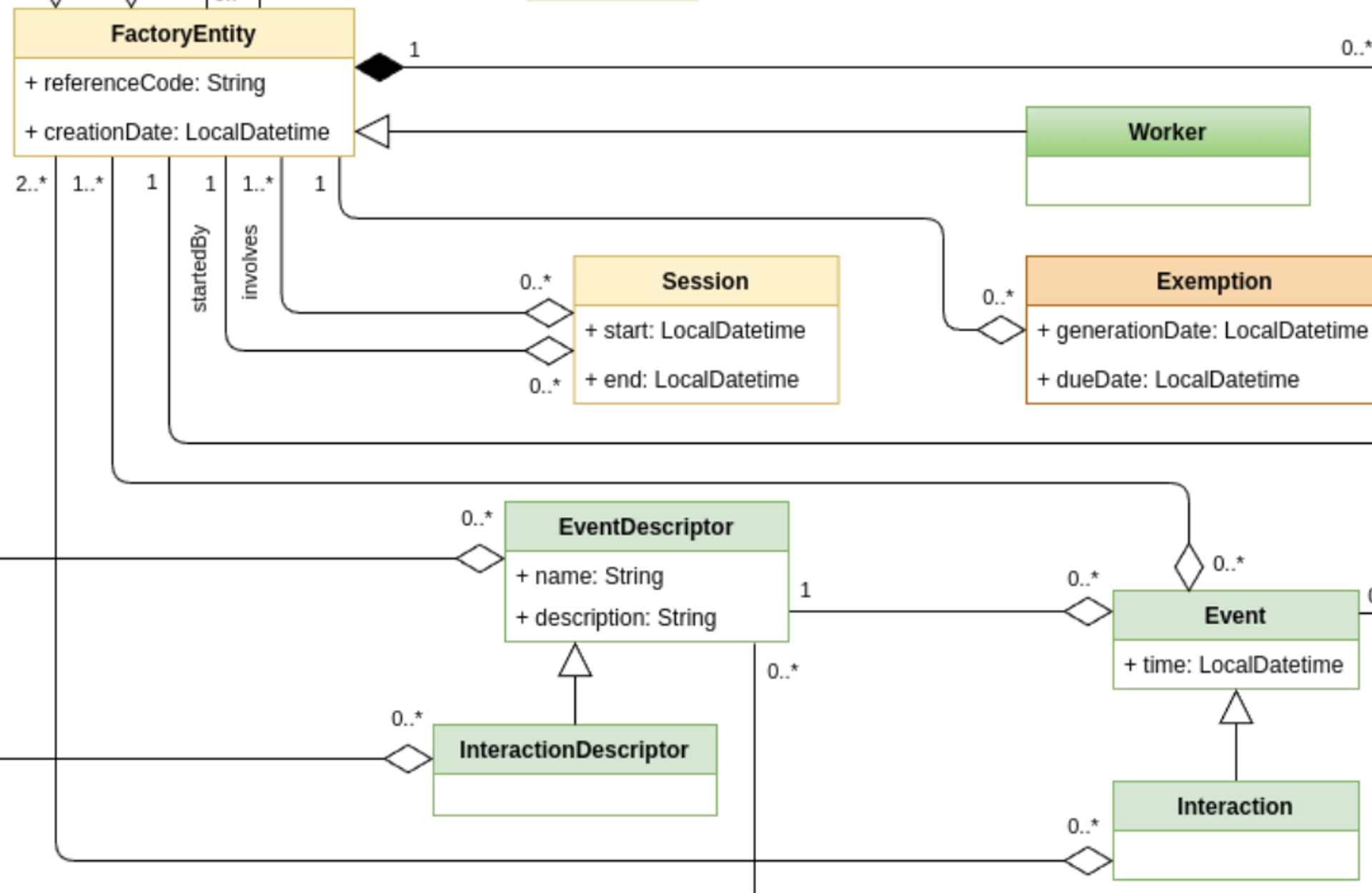
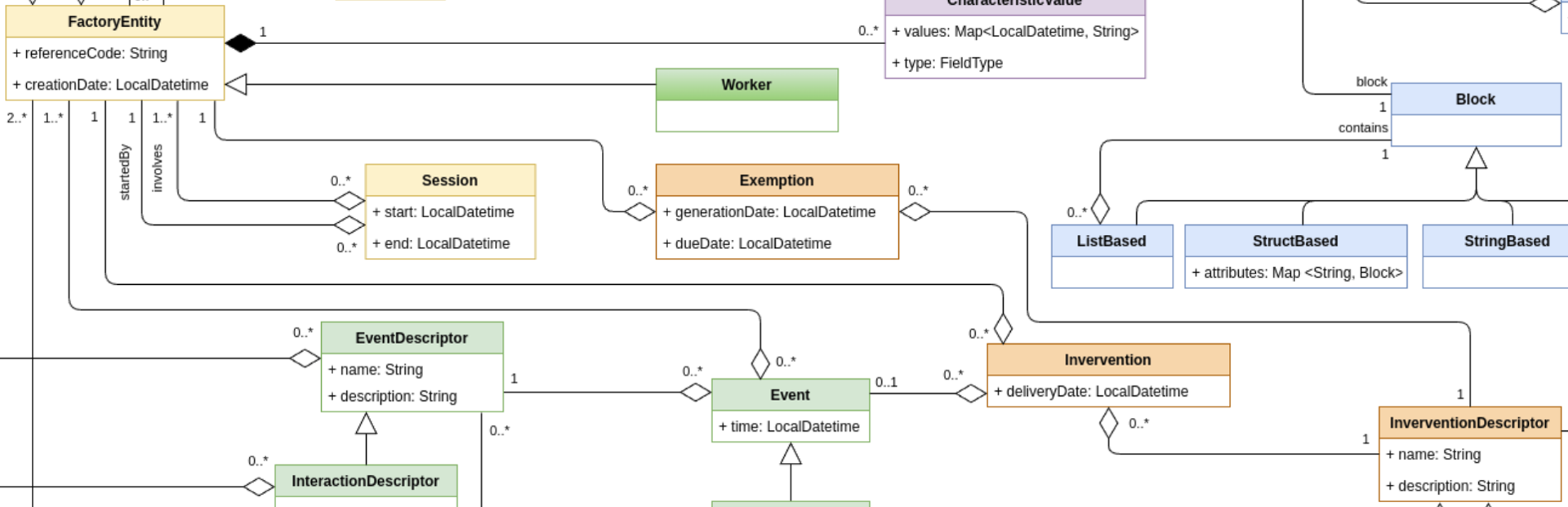
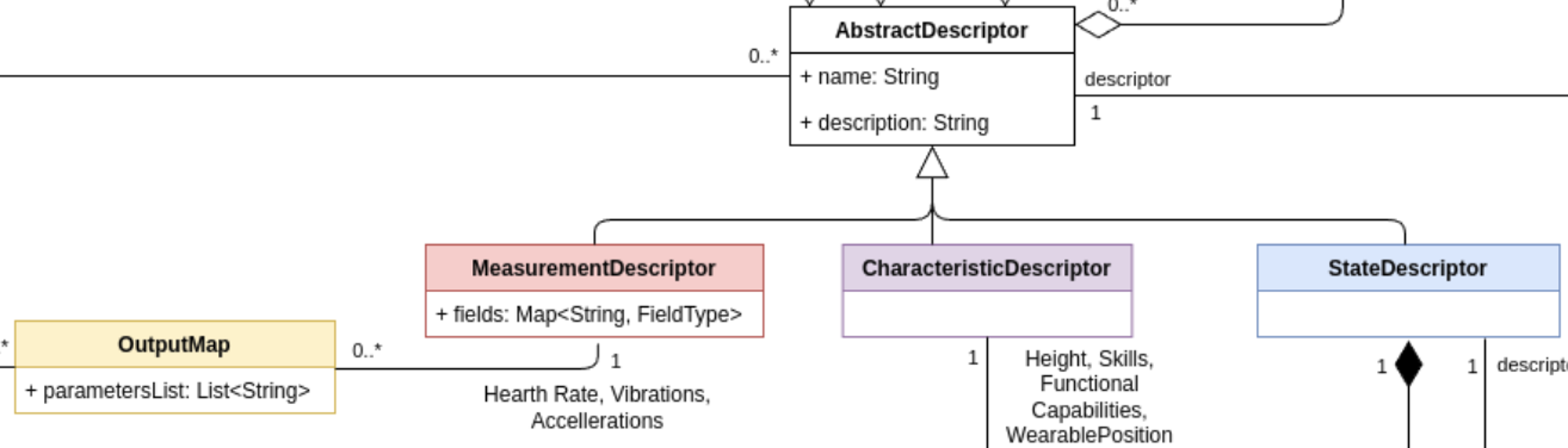
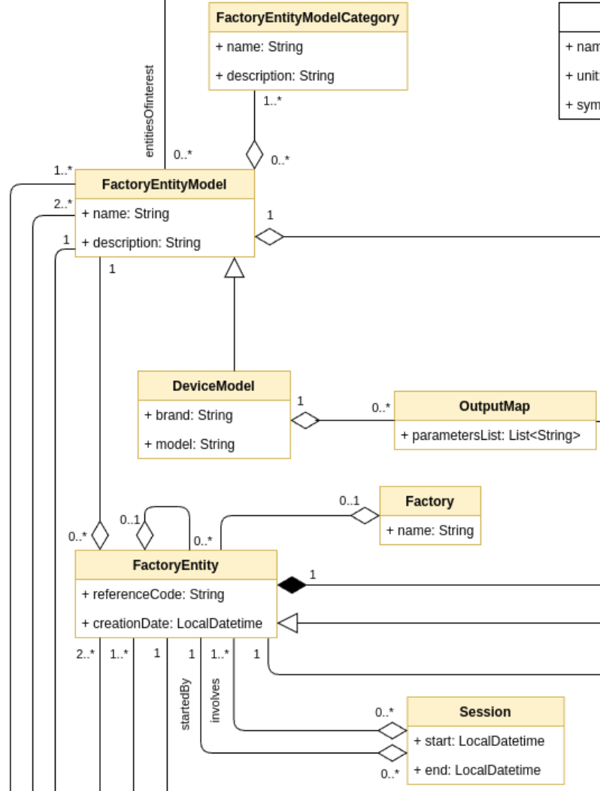
This version strengthens our commitment to intelligent, interoperable workforce data, with a sharp focus on integration, validation, and scalability.
What’s New?
Clawdite v0.4 delivers critical updates to both the technical infrastructure and user-facing services, ensuring the platform can support increasingly complex Human Digital Twin use cases in industrial environments.
JSON-Based IIoT Messaging Support
At the core of v0.4 is a major upgrade to the IIoT middleware, which now fully supports MQTT messages in JSON format for both measurements and states.
This makes it easier to:
Integrate heterogeneous IIoT devices and data sources,
Ensure consistent message structure across modules,
Enable downstream applications (e.g., real-time dashboards, anomaly detectors) to parse and act on messages more efficiently.
Refactored Core Modules with Message Validation
To support this change, the HDM, HDM Web, and all publishers (including Functional Modules and the IIoT Layer) have been refactored and hardened.
These improvements bring:
Stricter message validation, preventing malformed or incomplete data from entering the system,
Greater reliability and robustness in high-frequency data environments,
Easier debugging and extension through modular, version-aware design.
Documentation Improvements and Versioning for a Better User Experience
We’ve also focused on improving the documentation website’s usability and transparency.
A new search bar is now live on the website, allowing users to quickly locate content, documentation, and updates.
The entire website is now versioned, giving users full control over which instance of Clawdite they’re exploring. This is particularly useful for organizations operating across multiple deployments or needing backward compatibility.
The documentation now supports JavaScript examples in addition to the existing Python and Java samples, making it easier for developers across different languages to follow along.
⚠️ Please note: A migration period will run throughout August 2025, after which v0.3 will be officially deprecated.
Why It Matters
These updates are not just quality-of-life improvements—they are enablers of scale and autonomy.
With JSON-based messaging and structured content validation, Clawdite v0.4 ensures that real-time data from the shop floor can be safely and meaningfully integrated into the Human Digital Twin ecosystem. This directly supports predictive capabilities, adaptive task planning, and human-centered automation across different use cases.
Most importantly, we now have more than 5 partners actively working autonomously within the scope of XR5.0 project on a shared instance of Clawdite, a major milestone demonstrating real-world trust and scalability.
Looking Ahead
Clawdite v0.4 sets the stage for some exciting developments. Our upcoming roadmap includes:
User Interfaces for entity creation and Human Digital Twin exploration,
Platform Multitenancy for better organization-level management,
Worker and User Skills Profiling for deeper human-aware adaptation,
Dedicated Functional Modules to support the evolving XR5.0 pilot requirements.
1 - Definitions and Standards
This document defines the core concepts used by the Clawdite platform and demonstrates their alignment with the ISO 23247 Digital Twin Framework for Manufacturing. The goal is to ensure Clawdite moves beyond ad-hoc industrial implementations toward a standardised, interoperable, and ISO-compliant architecture.
Standards Reference
Clawdite aligns with the following international standard:
ISO 23247 – Digital Twin Framework for Manufacturing
ISO 23247-1: Overview and General Principles
ISO 23247-2: Reference Architecture
Core Definitions
To ensure compatibility with international standards while reflecting the specific scope of Clawdite, the definitions below are adopted directly or derived from ISO 23247-1.
Observable Manufacturing Element (OME)
An Observable Manufacturing Element (OME) is:
An item that has an observable physical presence or operation in manufacturing.
Examples include:
Personnel
Equipment
Materials
ISO Alignment ISO 23247-1 explicitly lists Personnel as a valid OME type.
Digital Twin (Manufacturing)
A Digital Twin (Manufacturing) is defined as:
A fit-for-purpose digital representation of an Observable Manufacturing Element (OME) with synchronisation between the physical element and its digital representation.
Human Digital Twin Context
When the OME is a human worker:
The physical entity is Personnel
The digital representation models worker-related attributes
Synchronisation enables analysis, simulation, and decision-making
Clawdite implements this definition by creating high-fidelity virtual replicas that support real-time reasoning and operational decisions, fully satisfying ISO requirements.
Human Digital Twin (HDT)
A Human Digital Twin is a Digital Twin where the OME is a human worker.
Typical attributes may include:
Availability
Certifications and qualifications
Physiological or ergonomic status
Operational constraints
Clawdite Platform
Clawdite is an extensible and flexible Industrial Internet of Things (IIoT) platform designed to support the creation of customised data representations of production systems and their entities, with a primary focus on Human Digital Twins.
Key characteristics:
Acts as a single source of production system data
Provides the implementation infrastructure for the Digital Twin Framework
Supports extensibility for analytics, simulation, and decision support
ISO Architecture Mapping:
Digital Twin Entity: Implemented via the Orchestrator and Data Managers
Device Communication Entity: Implemented via Agents and Gateways
(As defined in ISO 23247-2)
Functional Modules
Functional Modules are pluggable computational components within Clawdite that process entity attributes to enable:
simulation, prediction, reasoning and decision-making.
Examples include:
Fatigue estimation algorithms
Skills and capabilities matching
Entities trajectories prediction
Workers’ activity monitoring
2 - Getting Started
Try Clawdite!
This documentation is mainly targeted to Linux distributions (tests have been done on Ubuntu 22.04). However, Docker
commands can be replicated on different OSs by installing the dedicated Docker library. Bash scripts are released for
Linux-based OSs only.
Prerequisites
All the components are provided as Docker images, thus the following
software is required:
Docker
Docker Compose
We tested our deployment on a machine running Ubuntu 22.04, with Docker v27.3.1,
and Docker Compose v1.29.2.
Installation
Download the Clawdite repository from GitLab by executing the following command:
Before running the containers, it is required to download the Docker images from
their respective registries. While some images are publicly available, some
other require credentials to be downloaded from private registries.
Images provided by SUPSI can be download from the GitLab container registry, which supports the token-based
authentication. Please send your request for a new token to the repository maintainers.
Once you are provided with a username and a token, you can issue the following
command to login to the private GitLab Docker registry and download the images:
Docker images are hosted in a private Docker Registry at gitlab-core.supsi.ch. Please contact the maintainers to get
registry credentials.
Run containers using Docker Compose:
$ docker-compose up -d
To stop the containers and delete all the managed volumes:
$ docker-compose down -v
3 - Architecture
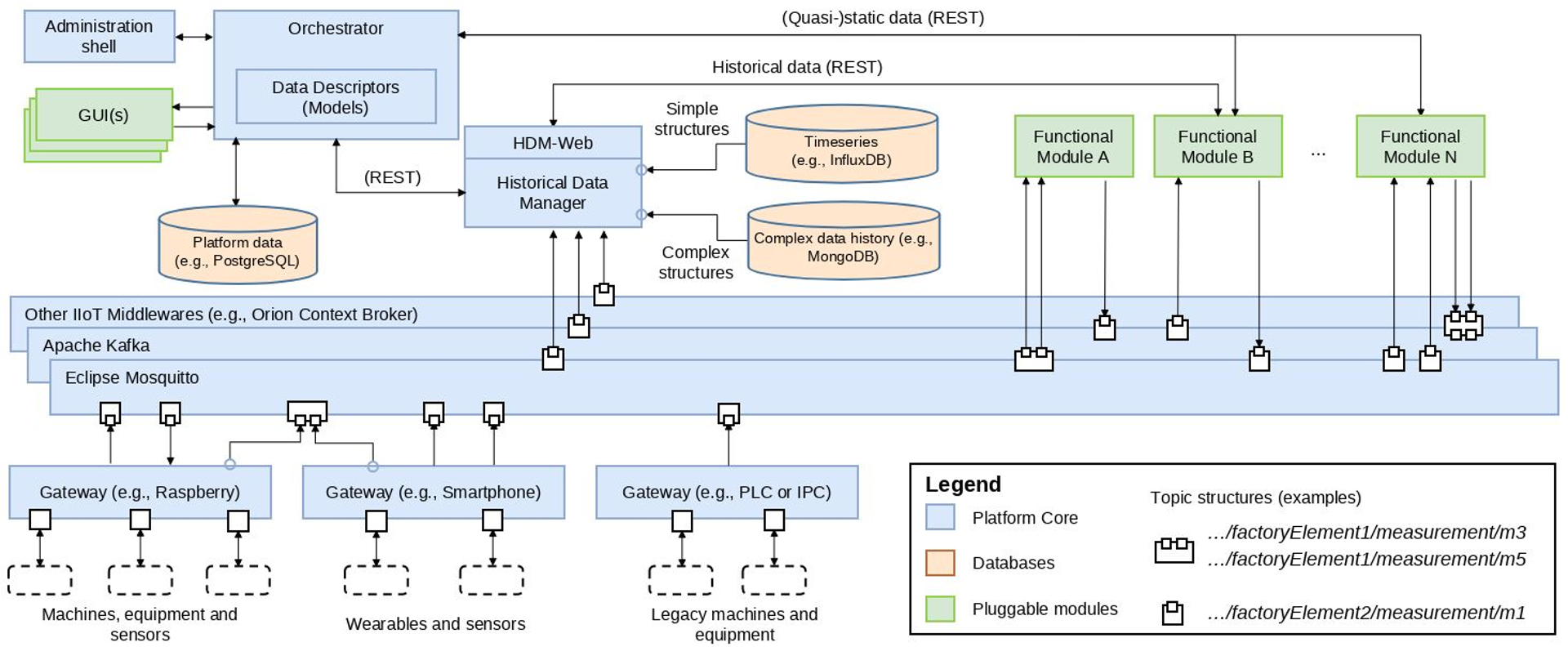
Clawdite platform architecture
The whole Clawdite platform’s architecture has been designed in order to be interoperable, extensible,
scalable and customizable.
Components
Gateways: standard interfaces to access the IIoT Middleware, as they stream data to the IIoT Middleware according
to predefined data formats. They could be deployed on Raspberries, smartphones, tablets and PLCs.
IIoT Middleware: responsible to make the different data streams available to each component of the architecture.
Different Middlewares can be integrated to meet the specific application requirements.
HDM (Historical Data Manager): retrieves and persists historical data coming from both Gateways and Functional
Modules. Most middlewares (e.g., MQTT brokers) do not provide such functionality, thus this component is needed to
enable reporting and analytics activities.
HDM-Web (Historical Data Manager Web): enables historical measurements and states retrievement via different
time-based endpoints. The data is provided in paginated format.
Orchestrator: responsible for organizing and managing the entire platform and its Digital Twins instances. It
knows how the platform and its architecture are structured, who the workers are, which are the installed modules, the
connected sensors and the message schemas adopted by the different modules and sensors.
Functional Modules: components external to the Platform that can be plugged to provide additional
functionalities (e.g. Fatigue Monitoring System). They take data from the Orchestrator and the Middleware and provide
the results of their processing to the Platform.
4 - Model
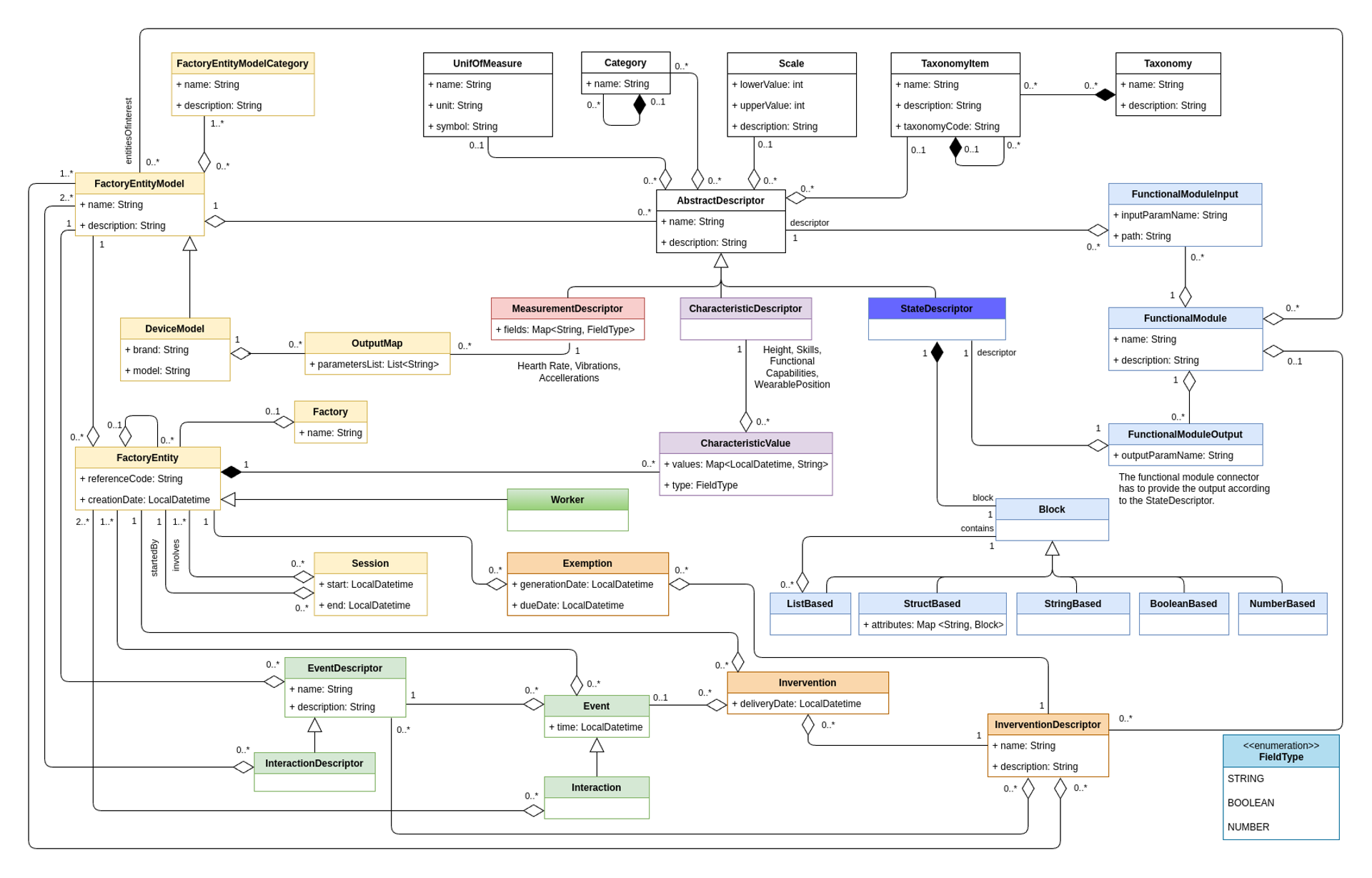
The Clawdite data model
Clawdite’s reference model describes a HDT including human-centred elements but also contextual elements, relevant to
characterise the workers and the surrounding environment in a production system. The model and its implementation
aim at releasing an extensible, scalable and adaptable HDT.
The advantage for the adopters of the proposed HDT model is two-fold:
they can rely on a model built on the robustness of a scientific result;
they are provided with ready-made packages of entities to instantiate
their own HDT, by including also human-centred aspects (e.g.,
interactions, events), and software-based simulations/predictions (e.g., output of functional models predicting the state of factory entities).
There are 3 main types of data which are managed in Clawdite: measurements (dynamic data), characteristic (quasi-static
data) and states (the output of functional modules).
Main elements
Descriptor Elements (white, red, purple and blue boxes): contains the description and definition of all the HDT entities,
and could be
characterized by unit of measures, scales, category and taxonomies.
Factory Elements (yellow boxes): The factory and its components are described by a hierarchical structure. The
worker has a dedicated representation for enabling processing in the functional modules.
Relationship Elements (green and orange boxes): events, interactions, interventions and exemptions describe the
relationship between factory entities or workers.
State Elements (sky blue boxes): Functional modules, based on the HDT knowledge, compute and provide insights related to factory
entities and workers according to the defined block format.
4.1 - Characteristic Models
Define quasi-static and static data describing workers and factory things.
This set of classes allows to define quasi-static and static data
describing workers and factory things.
Clawdite model: highlight on Characteristic Models
Note that the required model attributes are indicated with a red asterisk ("*"). For mandatory
relations, refer to the multiplicity instead, as relationships are defined on one side only (i.e., a specific
relationship might be described within the other related entity).
CharacteristicDescriptor
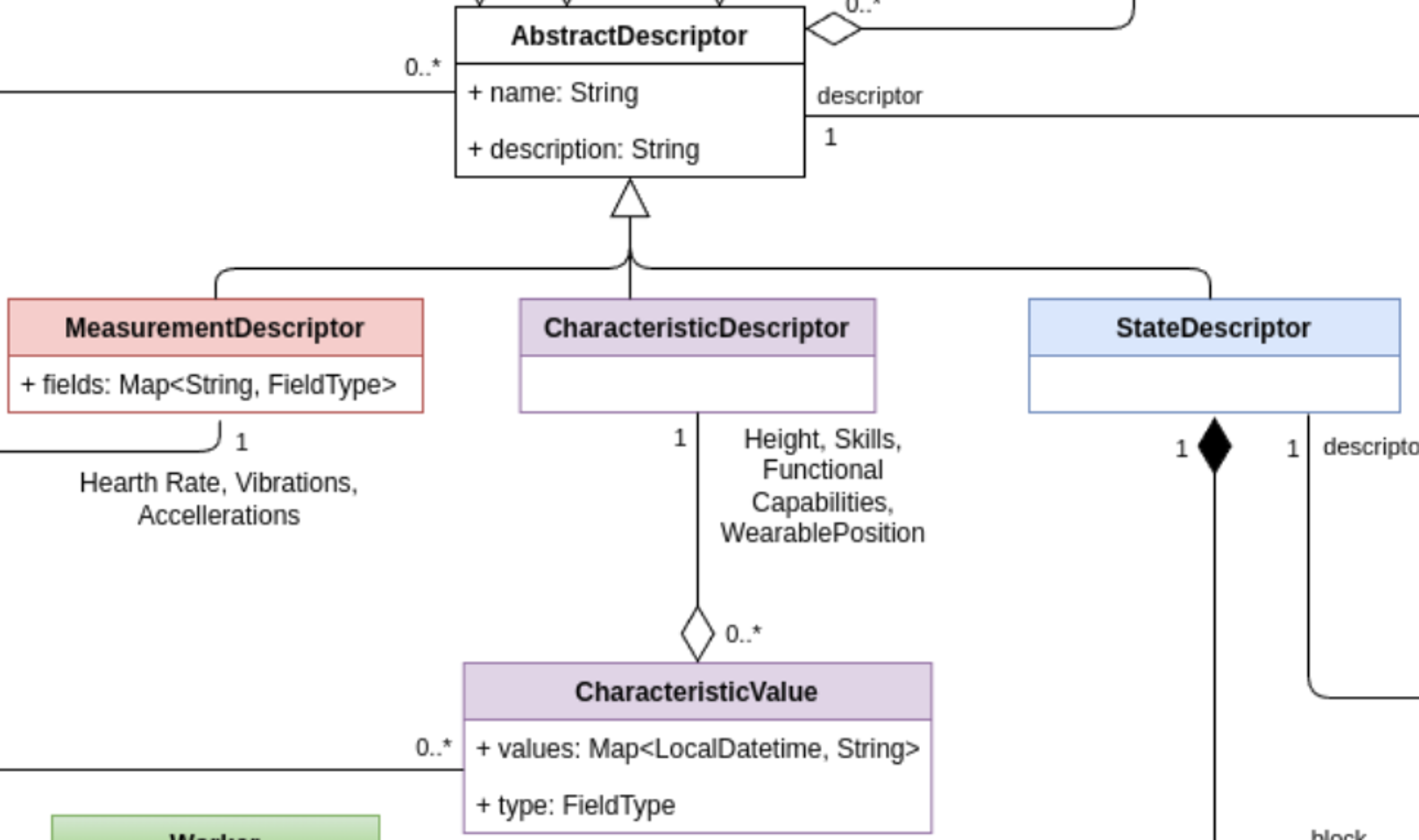
The CharacteristicDescriptor allows the extension of
AbstractDescriptor with a specific class dedicated to (quasi-)static
data. The class can include any kind of characteristics relevant for the
description of workers and other entities in the factory. For example,
the height or the set of skills may be workers’ features modelled
through the class CharacteristicDescriptor.
CharacteristicValue
The class CharacteristicValue allows the definition of the value
that characterise a CharacteristicDescriptor of a specific factory
entity, represented by the classFactoryEntity.
The CharacteristicValue is described by the following attributes:
Attribute
Type
Description
values*
Map<LocalDatetime, String>
A map with all the values the characteristic assumed over time, indexed by the acquisition timestamp. For example, the “weight” characteristic has 3 values if the worker has been weighted 3 times.
type*
TypeField
The actual type of the values listed in the values Map. It is useful to correctly parse the content of the string value.
The CharacteristicValue has the following relations:
Class
Relation type
Multiplicity
Description
CharacteristicDescriptor
Composition
1
The CharacteristicValue is always composed by a CharacteristicDescriptor, to which the value refers to.
FactoryEntity
Composition
1
The CharacteristicValue is always related to a FactoryEntity, to which the characteristic refers to.
4.2 - Common Descriptors
Describe properties, characteristics, measurements, dimensions and states of the entities operating in a factory.
The classes belonging to the Common Descriptors allow the description of
properties, characteristics, measurements, dimensions and states of the
many entities operating in a factory, including workers, machines,
robots and devices.
Clawdite model: highlight on Common Models
Note that the required model attributes are indicated with a red asterisk ("*"). For mandatory
relations, refer to the multiplicity instead, as relationships are defined on one side only (i.e., a specific
relationship might be described within the other related entity).
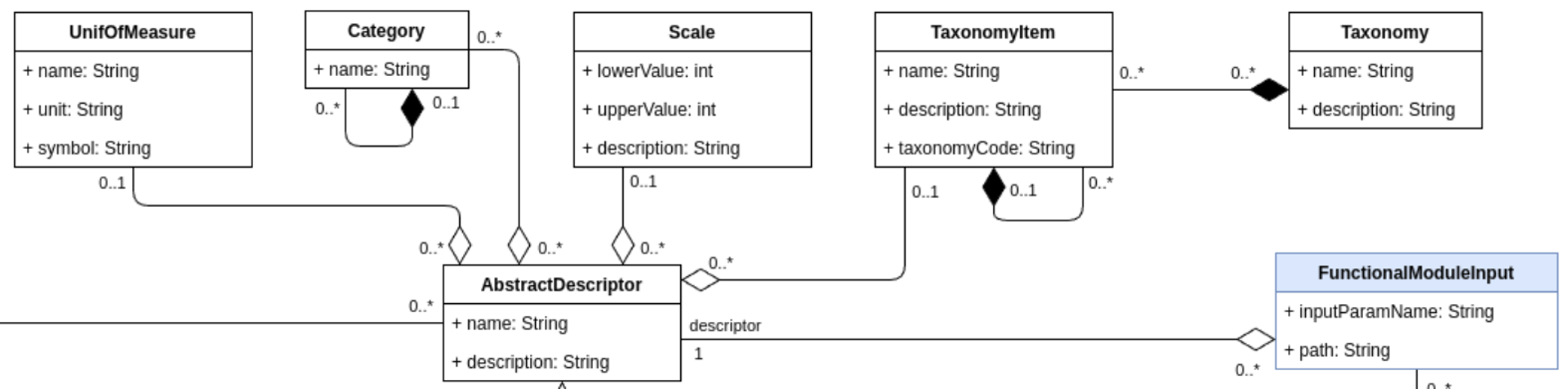
AbstractDescriptor
The AbstractDescriptor allows the description of any type of data
managed by the HDT: characteristics, measurements and states. The
descriptor can be enriched with different information such as its
UnitOfMeasure, Category, TaxonomyItem and Scale. Thanks to these
auxiliary classes, the AbstractDescriptor(s) can be of different
nature, depending on the factory thing they describe.
The AbstractDescriptor is described by the following attributes:
Attribute
Type
Description
name*
String
The name of the element the AbstractDescriptor describes.
description*
String
A Human-readable description of the AbstractDescriptor.
The AbstractDescriptor has the following relations:
Class
Relation type
Multiplicity
Description
UnitOfMeasure
Aggregation
0..1
An AbstractDescriptor can be related to at most one unit of measure.
Category
Aggregation
0..*
An AbstractDescriptor can be related to zero or more categories.
Scale
Aggregation
0..1
An AbstractDescriptor can be related to at most one scale.
TaxonomyItem
Aggregation
0..1
An AbstractDescriptor can be related to at most one taxonomy item.
FunctionalModuleInput
Association
0..*
An AbstractDescriptor can refer to zero or more input parameters of a functional module[^1].
An AbstractDescriptor can be specialized into:
CharacteristicDescriptor: it describes static or quasi-static
data characterising entities in a factory (e.g., workers, robots).
Examples of characteristics for workers are: a skill, an
anthropometric characteristic, a job position. Examples of
characteristics for machines are: weight, dimension.
StateDescriptor: it describes the state of entities in a
factory. For example, in the case of a worker, possible states are
the current task, the next task to perform, the level of perceived
fatigue, the current production performance.
MeasurementDescriptor: it describes a measurement collected from
a sensor (usually onboarded on a device), which refers to a factory
entity. For example, in the case of a worker, a
MeasurementDescriptor can describe the heart rate, measured by a
wearable device.
UnitOfMeasure
The class UnitOfMeasure has been defined to facilitate the handling
of the units of measure, which can refer to all the
AbstractDescriptor(s) (i.e., CharacteristicDescriptor(s),
StateDescriptor(s), and MeasurementDescriptor(s)). This class
allows the definition of a unit of measurement.
The UnitOfMeasure is described by the following attributes:
Attribute
Type
Description
name*
String
Name of the unit of measure
unit*
String
Unit of the unit of measure
symbol*
String
Symbol representing the unit of measure
Category
The class Category describes an AbstractDescriptor by means of
an enumeration. For example, it can be "Anthropometric
Characteristic", "Ability", "Skill", etc. It facilitates the
organization and structuring of AbstractDescriptor(s).
The Category is described by the following attributes:
Attribute
Type
Description
name*
String
The name of the category
The Category has the following relations:
Class
Relation type
Multiplicity
Description
Category
Composition
0..*
A Category can be composed by a set of sub-categories, that allows to create a hierarchical structure.
Category
Association
0..1
A Category can have at most one parent category in the hierarchical structure.
Taxonomy and TaxonomyItem
The Taxonomy class is used to classify an AbstractDescriptor
accordingly with a taxonomy (either a well-know taxonomy, like (e.g.,
O*Net or ESCO for working skills, or a private one , e.g., a taxonomy
that organises the roles in the company).
The Taxonomy is described by the following attributes:
Attribute
Type
Description
name*
String
Name of the Taxonomy.
description*
String
Human readable description of the Taxomy.
The Taxonomy has the following relations:
Class
Relation type
Multiplicity
Description
TaxonomyItem
Composition
0..*
A Taxonomy is composed by a set of TaxonomyItem(s), representing the single items belonging to the taxonomy.
A Taxonomy is composed by a set of TaxonomyItem(s), which
represent the single items that compose a taxonomy (e.g., for the skills
taxonomy, each TaxonomyItem represents a skill; in the case of the
O*Net taxonomy, “Operation Monitoring”, “Quality Control Analysis”, and
“Reading Comprehension” are TaxonomyItems).
The TaxonomyItem is described by the following attributes:
Attribute
Type
Description
name*
String
Name of the TaxonomyItem.
description*
String
Human-readable description of the TaxonomyItem.
taxonomyCode*
String
Code that represents the item in the taxonomy.
The TaxonomyItem has the following relations:
Class
Relation type
Multiplicity
Description
TaxonomyItem
Composition
0..*
A TaxonomyItem can be composed by a set of sub-items, creating a hierarchical structure.
TaxonomyItem
Association
0..1
A TaxonomyItem may have one parent item in the hierarchical structure.
Scale
The Scale class is used to provide an AbstractDescriptor with a
scale that narrows its possible values, making it easier to assign,
understand, and interpret the measured value in a meaningful way.
The Scale is described by the following attributes:
Attribute
Type
Description
lowerValue*
Int
The lowest value that can be assigned to the scale.
upperValue*
Int
The highest value that can be assigned to the scale.
description*
String
Human readable description of the Scale. If the scale refers to qualitative/subjective values, it has to include a description of the assignment methodology.
4.3 - Event and Interaction Models
Define the events and interactions between entities in the factory.
This section contains classes that are relevant for defining interactions between
entities in the factory.
Clawdite model: highlight on Interaction and Event Models
Note that the required model attributes are indicated with a red asterisk ("*"). For mandatory
relations, refer to the multiplicity instead, as relationships are defined on one side only (i.e., a specific
relationship might be described within the other related entity).
EventDescriptor and InteractionDescriptor
The EventDescriptor class describes the events that change the HDT
status, evolving any of its entities or attributes. An event is related to a single entity. Events involving multiple
entities are represented through Interaction(s).
The EventDescriptor is described by the following attributes:
Attribute
Type
Description
name*
String
Name of the EventDescriptor.
description*
String
Human readable description of the EventDescriptor.
The EventDescriptor has the following relations:
Class
Relation type
Multiplicity
Description
FactoryEntityModel
Aggregation
1
The FactoryEntityModel that is involved in the event.
The InteractionDescriptor class specifies the EventDescriptor,
requiring the event being an interaction between two or more
FactoryEntityModel(s) (e.g., a collision between a robot and a
worker, a worker that loads a pallet on an AGV, etc.).
The InteractionDescriptor has the following relations:
Class
Relation type
Multiplicity
Description
FactoryEntityModel
Aggregation
2..*
The FactoryEntityModel(s) that are involved in the interaction.
For example, a InteractionDescriptor can be “Impact between cobot
and worker”, which aggregate the FactoryEntityModel(s) “Assembly
Worker” and “Cobot UR10”.
Event and Interaction
The Event class defines an event described by an
EventDescriptor.
The Event is described by the following attributes:
Attribute
Type
Description
time *
LocalDatetime
Date and time when the interaction event occurs.
The Event class has the following relations:
Class
Relation type
Multiplicity
Description
FactoryEntity
Aggregation
1..*
An Event aggregates FactoryEntity(s) and those things have been involved in the event.
As per the EventDescriptor class, also the Event class is
extended by the Interaction class, which requires the event to
involve at least two FactoryEntity(s). Indeed, the Interaction class
has the following relations:
Class
Relation type
Multiplicity
Description
FactoryEntity
Aggregation
2..*
An aggregates FactoryEntity(s) and those things have been involved in the event.
4.4 - Intervention Models
Define interventions to orchestrate the production system and the things acting within it.
This set of classes allows to describe interventions to orchestrate the
production system and the things acting within it, optimising
performance and/or increasing workers’ wellbeing.
Clawdite model: highlight on Intervention Models
Note that the required model attributes are indicated with a red asterisk ("*"). For mandatory
relations, refer to the multiplicity instead, as relationships are defined on one side only (i.e., a specific
relationship might be described within the other related entity).
InterventionDescriptor and Intervention
The class InterventionDescriptor allows the definition of
interventions that can be triggered to orchestrate the production system
and its entities (i.e. the tasks to perform). Examples of intervention descriptors are: to deliver a
notification to the operator, to set-up and activate a robot
part-program, to turn-on a tool or to adjust the speed of a spindle.
Interventions could be fired by the FunctionalModule(s) in charge of
decision-making, defining workers and the things of the factory to be
triggered.
The InterventionDescriptor is described by the following attributes:
Attribute
Type
Description
name*
String
Name of the FunctionalModule.
description*
String
Human readable description of the FunctionalModule.
The InterventionDescriptor has the following relations:
Class
Relation type
Multiplicity
Description
FactoryEntityModel
Composition
1..*
Relation with factory entity models affected by the intervention.
EventDescriptor
Composition
0..*
The EventDescriptor of the event that is triggered by the Intervention.
The class Intervention describes a triggered and actuated
intervention.
The Intervention is described by the following attributes:
Attribute
Type
Description
deliveryDate*
datetime
Date and time when the intervention has been delivered to the factory entity.
The Intervention class has the following relations:
Class
Relation type
Multiplicity
Description
FactoryEntity
Composition
1..1
The FactoryEntity targeted by the Intervention.
Event
Composition
1..1
The Event triggered by the Intervention.
Exemption
The class Exemption allows to specify which FactoryEntity(ies) are exempted from a specific
InterventionDescriptor (i.e. task). An Exemption is related to a single entity-task tuple, in order to specify exemptions related to multiple entities for the same task, or to assign multiple task exemptions to the same entity, it
is needed to create different Exemption(s).
The Exemption is described by the following attributes:
Attribute
Type
Description
generationDate
LocalDateTime
Date from which is Exemption is valid.
dueDate
LocalDateTime
Date on which the Exemption expires.
The Exemption has the following relations:
Class
Relation type
Multiplicity
Description
FactoryEntity
Composition
1
Relation with the FactoryEntity subject to the Exemption.
InterventionDescriptor
Composition
1
The InterventionDescriptor associated to the Exemption.
4.5 - Measurement Models
Define measurements and data collected from workers and things in the factory.
This set of classes allows describing measurements and data collected
from workers and things in the factory.
Clawdite model: highlight on Measurement Models
Note that the required model attributes are indicated with a red asterisk ("*"). For mandatory
relations, refer to the multiplicity instead, as relationships are defined on one side only (i.e., a specific
relationship might be described within the other related entity).
MeasurementDescriptor
The MeasurementDescriptor extends the AbstractDescriptor with a
specific class dedicated to dynamic data, streamed by wearable devices,
sensors and PLCs. These can include any kind of relevant data collected
from factory entities. For example, hearth rate, galvanic skin response,
vibrations, accelerations, temperature could be modelled through the
class MeasurementDescriptor.
The MeasurementDescriptor is composed by the following attributes:
Attribute
Type
Description
fields*
Map<String, FieldType>
This map relates the field data type with the field itself. For example, acceleration is composed by three fields: accX, accY and accZ. This attribute specifies the type of each field.
4.6 - Production System Models
Define entities acting in the factory and collecting measurements to feed the HDT.
This set of classes allows the definition of entities acting in the
factory and collecting measurements to feed the HDT.
Clawdite model: highlight on Production System Models
Note that the required model attributes are indicated with a red asterisk ("*"). For mandatory
relations, refer to the multiplicity instead, as relationships are defined on one side only (i.e., a specific
relationship might be described within the other related entity).
FactoryEntityModel
The FactoryEntityModel class describes the digital counterpart of
the entities populating and thus acting in the factories such as robots,
machines, pallets, workers, etc. . Characteristics, states, measurements
and interactions of such entity models have to be included in the HDT.
It is important to remark that the FactoryEntityModel is a generic
representation of a factory entity, not its specific instance. For
example, a FactoryEntityModel could be “assembly operator” or “Cobot
UR10”. Specific instances of these models can be described in the
Worker class, in case of a worker, and in the FactoryEntity in
case of any other type of entity.
The FactoryEntityModel is described by the following attributes:
Attribute
Type
Description
name*
String
Name of the FactoryEntityModel.
description*
String
Human readable description of the FactoryEntityModel.
The FactoryEntityModel has the following relations:
Class
Relation type
Multiplicity
Description
AbstractDescriptor
Composition
0..*
A FactoryEntityModel is composed by a set of AbstractDescriptor(s). They represent characteristics, measurements and states that have to be represented in the HDT for describing the FactoryEntityModel.
FactoryEntityModelCategory
Composition
1..*
A FactoryEntityModel has at least one FactoryEntityModelCategory.
For example, a FactoryEntityModel could be Cobot UR10 which could be composed by the following AbstractDescriptor(s):
CharactersticDescriptor: reach, number of joints, installation date, etc.
StateDescriptor: availability, current end-effector, current task, next task to be performed, etc.
MeasurementDescriptor: joints position, workbench vibration, etc.
FactoryEntityModelCategory
The FactoryEntityModelCategory specifies the category of a
FactoryEntityModel. In this way, it is possible to organize
FactoryEntityModel(s). For example, the FactoryEntityModel “wearable
device” may be assigned to two different categories: “wrist band” and
“chest band”.
The FactoryEntityModelCategory is described by the following
attributes:
Attribute
Type
Description
name*
String
Name of the FactoryEntityModelCategory.
description*
String
Human readable description of the FactoryEntityModelCategory.
DeviceModel
The DeviceModel is used to describe any device that generates
measurements, including sensors, machines and wearables. Exactly like
the FactoryEntityModel, the DeviceModel is a generic description
of a device (it is not a specific instance). The need for this class
arises from the fact that device models (e.g., vibration sensor SW-420,
Siemens Simatic S7-1200), including wearables (e.g. Garmin Instinct)
collect measurements in different ways and with different data
structures. The DeviceModel class allows a particular device model
to be described, enabling the mapping of physical device outputs to one
or more MeasurementDescriptor(s) or StateDescriptor(s) in the
HDT, minimizing the overhead of connecting devices of the same model.
The DeviceModel is described by the following attributes:
Attribute
Type
Description
brand*
String
Name of the device brand.
model*
String
Name of the device model.
The DeviceModel has the following relations:
Class
Relation type
Multiplicity
Description
OutputMap
Aggregation
0..*
This is the relation between the DeviceModel and the OutputMap that allows the HDT to translate and use as input data collected from a device to feed a MeasurementDescriptor.
OutputMap
The OutputMap maps a physical parameter measured by a device with
the field described by a MeasurementDescriptor, making the
descriptor independent from the device models. A DeviceModel can
produce different types of measurements (e.g., heart rate, blood
pressure, etc.). This measurement must be created and described in the
HDT using MeasurementDescriptor(s) so that other components can
interact with it. Therefore, the stream of a device data must be mapped
and connected to a MeasurementDescriptor. Moreover, different
DeviceModel(s) may feed the same MeasurementDescriptor. For
example, two wearable device models (e.g., Garmin Instinct and Polar
OH1), may provide the same measurement (e.g., hearth rate). However, a
user wants to have a unique representation of that measurement in the
HDT. Therefore, a unique MeasurementDescriptor is created in the
HDT, and each wearable model has an OutputMap, mapping the different
outputs of the wearables to the same MeasurementDescriptor.
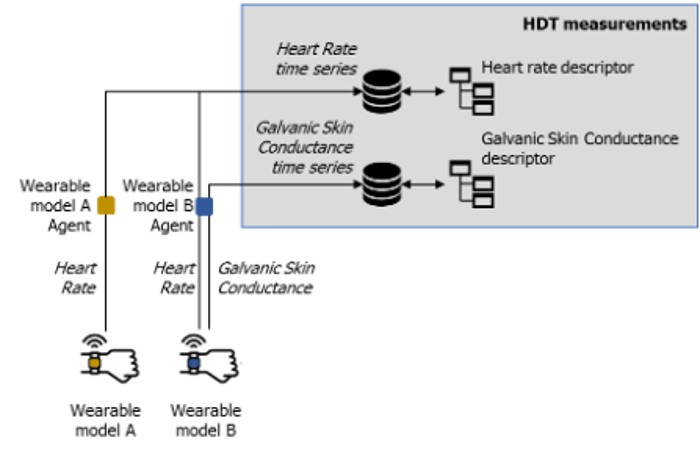
Different devices, collecting same physiological, feeding the same measurement
The OutputMap is described by the following attributes:
Attribute
Type
Description
parameterList*
List<String>
An ordered sequence of device parameters. This sequence must be met when writing actual measurements to the HDT. For example, if a device produces 3 values for the accelerometer (x, y, z), some valid parameterLists are [x, y, z], [z, x, y], [x, y] (if the z value is not relevant for the HDT).
The OutputMap has the following relations:
Class
Relation type
Multiplicity
Description
MeasurementDescriptor
Composition
1
This is the relation that allows the HDT to map and use as input data collected from a device to feed a MeasurementDescriptor.
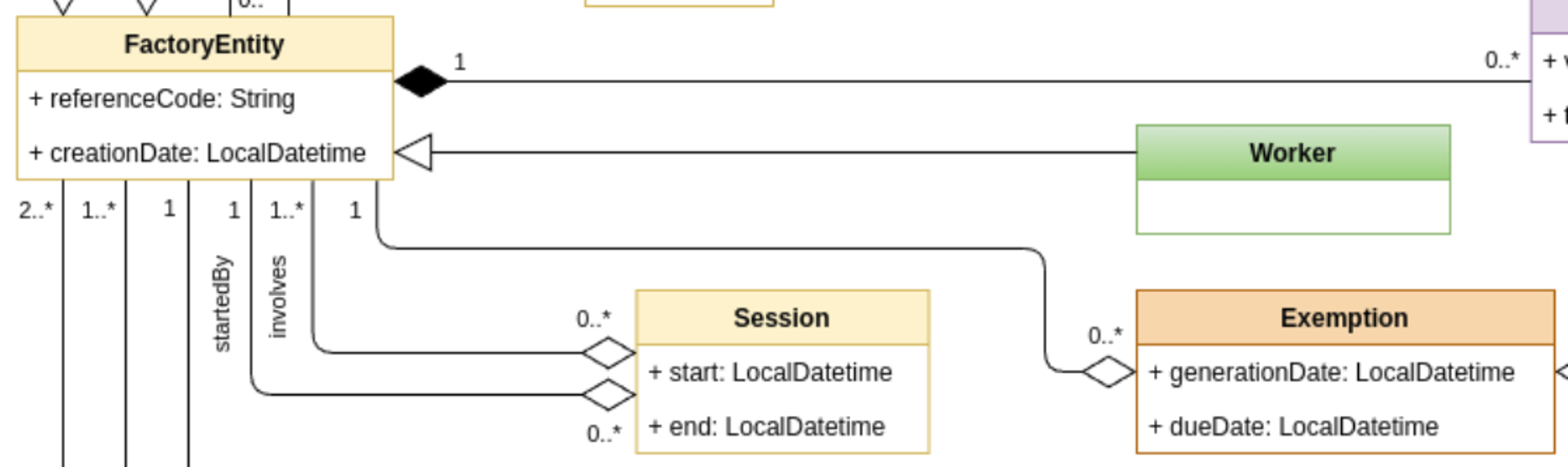
FactoryEntity
The FactoryEntity class allows the creation of instances of entities
in a factory described through a FactoryEntityModel. The
FactoryEntity is a specific entity that populates the factory.
The FactoryEntity is described by the following attributes:
Attribute
Type
Description
referenceCode
String
The code used to refer to the digital entity in the real world. For devices, it could be a serial number, a mac address, or any other label. For workers, it can be a registration number, a badge number, or other anonymous (or anonymized) codes.
creationDate*
LocalDatetime
The date when the instance has been added to the HDT.
The FactoryEntity has the following relations:
Class
Relation type
Multiplicity
Description
FactoryEntiityModel
Composition
1
The specific FactoryEntityModel associated to the entity.
FactoryEntiity
Association
0..1
A FactoryEntity can have at most one parent entity in the hierarchical structure.
FactoryEntiity
Composition
0..*
A FactoryEntity can be composed by a set of sub-entities, that allows to create a hierarchical structure.
Factory
Association
0..1
The Factory to which the entity is associated.
Factory
The Factory class allows the definition of a factory where the
FactoryEntity(s) act and operate, being able to have HDT
representing entities in different production systems.
The Factory is described by the following attributes:
Attribute
Type
Description
name*
String
Name of the Factory.
Session
The Session class allows data collection or working sessions to be
defined; in such a way, the HDT tracks exactly when a particular
FactoryEntity performs a specific activity, and to match
Event(s), Interaction(s), and Intervention(s) with specific
time slots.
The Session is composed by the following attributes:
Attribute
Type
Description
start*
LocalDatetime
Date and time when the session starts.
end
LocalDatetime
Date and time when the session ends.
The Session has the following relations:
Class
Relation type
Multiplicity
Description
FactoryEntiity
Composition
1
The FactoryEntity who started the Session.
FactoryEntiity
Composition
1..*
The FactoryEntity who are involved in the Session.
4.7 - State Models
Define states computed by functional modules by elaborating entities and attributes, making the HDT capable of simulating, predicting, reasoning, and deciding.
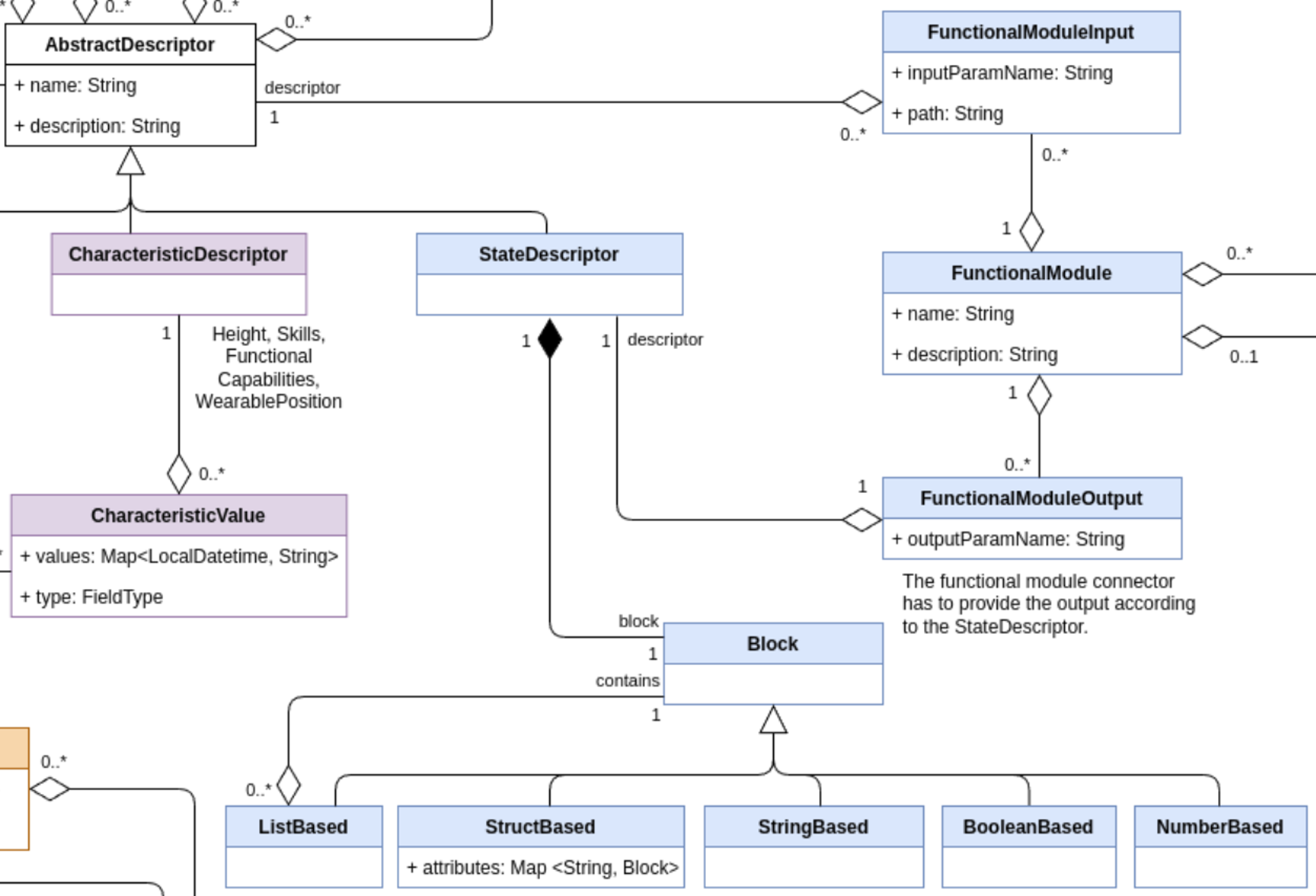
This set of classes aims at describing states characterizing factory
entities. States are computed by functional modules, which describe all
those computational processes that can elaborate entities and
attributes, making the HDT capable of simulating, predicting, reasoning,
and deciding. The class FunctionalModule aggregates one or more
events that can be used to update the state of the HDT depending on the
result of the computation performed. Inputs are defined and mapped
through the class FunctionalModuleInput to the entities needed by
the model (e.g., physiological parameters and worker conditions for
detecting fatigue level). Internally, functional models can employ any
mean of data processing and calculation such as mathematical functions,
machine learning, or empirical models. These, if necessary, can be
stored as binary blobs and annotated to be managed correctly.
Clawdite model: highlight on State Models
Note that the required model attributes are indicated with a red asterisk ("*"). For mandatory
relations, refer to the multiplicity instead, as relationships are defined on one side only (i.e., a specific
relationship might be described within the other related entity).
StateDescriptor
The StateDescriptor extends the AbstractDescriptor with a
specific class dedicated to the description of states of both workers
and things in the factory. These states are computed by the
FunctionalModule(s). The StateDescriptor can describe the state
of a cobot in the form of the current pose, current part program, or the
position or the fatigue level of a worker.
The StateDescriptor has the following relations:
Class
Relation type
Multiplicity
Description
Block
Aggregation
1
The output schema description provided by a module.
FunctionalModuleOutput
Aggregation
1
The output data from the FunctionalModule.
FunctionalModule
The FunctionalModule class allows to describe any model that
generates states. A model could be an AI algorithm or a simple data
processor. The FunctionalModule defines a model that acts in the HDT
and produces outputs that feed the HDT state. An example of
FunctionalModule is the Fatigue Monitoring System or an Activity
Detection Module.
The FunctionalModule is described by the following attributes:
Attribute
Type
Description
name*
String
Name of the FunctionalModule.
description*
String
Human readable description of the FunctionalModule.
The FunctionalModule has the following relations:
Class
Relation type
Multiplicity
Description
FunctionalModuleInput
Composition
0..*
This is the relation between FunctionalModule expected inputs, and HDT available AbstractDescriptors. This relation allows the HDT to translate the module input parameter names to actual MeasurementDescriptor(s), CharacteristicDescriptor(s) and StateDescriptor(s).
FunctionalModuleOutput
Composition
0..*
This is the relation that allows the HDT to map to FunctionalModule’s outputs to a StateDescriptor.
InterventionDescriptor
Composition
0..*
This is the relation between the FunctionalModules supporting the decision making and the InterventionDescriptor, that allows to trigger interventions on the production system.
FactoryEntityModel
Composition
0..*
This relation specifies the factory entities that are relevant for the FunctionalModule, i.e., that must be monitored by the FunctionalModule. For example, the Fatigue Monitor System is interested in monitoring new workers.
FunctionalModuleInput
The FunctionaModelInput supports the mapping that relates an
AbstractDescriptor modelled into the HDT to an input that feeds the
FunctionalModule. It allows the HDT to integrate modules that
require input data with different structures than those described by
MeasurementDescriptor(s), CharacteristicDescriptor(s) and
StateDescriptor(s).
The FunctionalModule is described by the following attributes:
Attribute
Type
Description
inputParamName*
String
The FunctionalModule reference name of the input parameter
path*
String
The HDT reference name of the input parameter
FunctionalModuleOutput
The FunctionalModulOutput supports the mapping that relates the
outputs of a FunctionalModule and the related StateDescriptor(s)
into the HDT. It allows the HDT to integrate modules that provide output
data with different structures than those described as a
StateDescriptor.
The FunctionalModule is described by the following attributes:
Attribute
Type
Description
outputParamName*
String
The HDT reference name of the result
Block
The Block class is a utility entity that enables the formalization
of the schema that describes the StateDescriptor(s), thus allowing
the HDT to be aware of the data format. This helps
FunctionalModule’s output validation against the schema, and also to
translate/map an output schema of a module to an input schema of another
module.
The Block structure describes every object's schema which contains
coherent lists (a list that comprises elements of the same kind). For
example, the location of different workers could be represented as
follow (for simplicity the JSON format is used):
This example of output could be easily described through the use of the
Block class:
StructBased workerBlock:
“id” → NumberBased
“x” → NumberBased
“y” → NumberBased
“pose” → StringBased
ListBased workersListBlock describe a list of workerBlock:
StructBased overallBlock describes the whole object as it follows:
“id” → NumberBased
“workers” → workersListBlock
ListBased
The ListBased class inherits from Block and describes a list
that contains elements structured as a Block, enabling the
definition of a coherent list that comprises data of the same type.
StructBased
The StructBased class inherits from Block and describes a
structure of Block(s). It can be seen as a dictionary with string
keys and Block values.
The StructBased is described by the following attributes:
Attribute
Type
Description
attributes*
Map<String, Block>
The mapping of a String key to a Block value.
StringBased
The StringBased block describes a simple attribute of type string,
which can be part of a StructBased or ListBased.
NumberBased
The NumberBased block describes a simple numerical attribute, which
can be part of a StructBased or ListBased.
BooleanBased
The BooleanBased block describes a simple bo attribute, which can be
part of a StructBased or ListBased.
4.8 - Worker Models
Define worker instances.
This section contains classes that are relevant for defining worker
instances.
Clawdite model: highlight on Worker Models
Worker
The class Worker allows the definition of worker instances. This
class is used to represent a specific worker in the production system.
As of today, the class just inherits its parent’s properties and
relationships, but it’s worth be noted that having a dedicated class
enables a fine-grained management of the HDT entities by the HDT user.
For example, measurements related to workers may require additional data
preserving rules (e.g., when collecting biometrics data); moreover,
workers can be “anonymized” within the HDT (e.g., the referenceCode may
be missing or an anonymous code), while this operation is meaningless
for other factory entities in almost all the cases. Moreover, the
behaviour of factory entities is in general predictable with
well-established models, while the behaviour of workers may be
unpredictable (due to non-measurable features, like emotions), and this
point plays a crucial role in an HDT. For this reason, it is important
to distinguish workers from other nonhuman factory entities.
5 - How to
Interact with the platform
Creating and reading entities and characteristics → Orchestrator REST API
Saving and reading real-time metrics and states → IIoT Middleware
Reading historical metrics and states → HDM REST API
5.1 - Orchestrator REST API
Create and read entities
The Orchestrator REST API enables to create and read all the different kinds of Digital Twin entities described
in Model section.
This API is available through a dedicated Swagger interface for each Clawdite instance. Furthermore, it is possible to
generate API clients for several languages, such as Python, Java and JavaScript. The mentioned clients are already
generated and available within each Clawdite instance and make it possible to interact with Clawdite’s Orchestrator
from
external components.
In the following a few examples on entities management via API clients will be provided. For mandatory entity attributes
refer to the Model section.
Install the Orchestrator client dependencies
In order to use the generated API clients inside external components it is needed to correctly setup and install the
dependencies. Note that you need a personal GitLab token for accessing the registries. In case you don’t have it please
contact the project’s maintainers.
The creation of a Factory is independent of other entities. While not mandatory, defining this entity can be very useful
when modeling a Clawdite instance. A Factory serves as the “container” for all related FactoryEntities, such as workers,
cells, machines, and equipment.
import os
from datetime import datetime
import orchestrator_python_client as hdt_client
from orchestrator_python_client import ApiClient, FactoryDto
# NOTE: you need to specify the HDT_ENDPOINT and HDT_API_KEY environment variablesconfiguration = hdt_client.Configuration(host=os.getenv('HDT_ENDPOINT'))
configuration.api_key['apiKeyAuth'] = os.getenv('HDT_API_KEY')
api_client = hdt_client.ApiClient(configuration)
factory_api = hdt_client.FactoryApi(api_client)
clawdite_factory = factory_api.create_factory(
FactoryDto(name="Clawdite Factory")).payload
import java.util.Collections;
import java.time.LocalDateTime;
import org.openapitools.client.ApiClient;
import org.openapitools.client.api.FactoryApi;
import org.openapitools.client.model.FactoryDto;
privatevoidcreateFactory() {
// NOTE: you need to specify the HDT_ENDPOINT and HDT_API_KEY environment variables ApiClient apiClient =new ApiClient().setBasePath(System.getenv("HDT_ENDPOINT"));
String apiKey = System.getenv("HDT_API_KEY");
if(apiKey !=null&&!apiKey.isEmpty())
apiClient.addDefaultHeader("x-api-key", apiKey);
final FactoryApi factoryApi =new FactoryApi(apiClient);
FactoryDto clawditeFactory = factoryApi.createFactory(
new FactoryDto()
.setName("Clawdite Factory"));
}
import { Configuration, FactoryApi, FactoryDto } from'orchestrator-javascript-client';
// NOTE: you need to specify the HDT_ENDPOINT and HDT_API_KEY environment variables
constconfiguration=newConfiguration({
basePath:process.env.HDT_ENDPOINT,
apiKey: { apiKeyAuth:process.env.HDT_API_KEY }
});
constfactoryApi=newFactoryApi(configuration);
asyncfunctioncreateFactory() {
awaitfactoryApi.createFactory(newFactoryDto({ name:"Clawdite Factory" }));
}
Create a Worker
In order to create a Worker entity (or a FactoryEntity in general) it is mandatory to define the
associated FactoryEntityModelCategoty and FactoryEntityModel in advance. This entity represents all the human beings
characterizing the Factory.
import os
from datetime import datetime
import orchestrator_python_client as hdt_client
from orchestrator_python_client import ApiClient, FactoryEntityModelCategoryDto, FactoryEntityModelDto, WorkerDto
# NOTE: you need to specify the HDT_ENDPOINT and HDT_API_KEY environment variablesconfiguration = hdt_client.Configuration(host=os.getenv('HDT_ENDPOINT'))
configuration.api_key['apiKeyAuth'] = os.getenv('HDT_API_KEY')
api_client = hdt_client.ApiClient(configuration)
factory_entity_model_category_api = hdt_client.FactoryEntityModelCategoryApi(api_client)
factory_entity_model_api = hdt_client.FactoryEntityModelApi(api_client)
worker_api = hdt_client.WorkerApi(api_client)
operator_category = factory_entity_model_category_api.create_factory_entity_model_category(
FactoryEntityModelCategoryDto(name="Operator",
description="description")).payload
worker_model = factory_entity_model_api.create_factory_entity_model(
FactoryEntityModelDto(name="Worker",
description="description",
factory_entity_model_categories_id=[operator_category.id])).payload
worker = worker_api.create_worker(
WorkerDto(creation_date=datetime.now().isoformat(),
factory_entity_model_id=worker_model.id)).payload
import java.util.Collections;
import java.time.LocalDateTime;
import org.openapitools.client.ApiClient;
import org.openapitools.client.api.FactoryEntityModelCategoryApi;
import org.openapitools.client.api.FactoryEntityModelApi;
import org.openapitools.client.api.WorkerApi;
import org.openapitools.client.model.FactoryEntityModelCategoryDto;
import org.openapitools.client.model.FactoryEntityModelDto;
import org.openapitools.client.model.WorkerDto;
privatevoidcreateWorker() {
// NOTE: you need to specify the HDT_ENDPOINT and HDT_API_KEY environment variables ApiClient apiClient =new ApiClient().setBasePath(System.getenv("HDT_ENDPOINT"));
String apiKey = System.getenv("HDT_API_KEY");
if(apiKey !=null&&!apiKey.isEmpty())
apiClient.addDefaultHeader("x-api-key", apiKey);
final FactoryEntityModelCategoryApi factoryEntityModelCategoryApi =new FactoryEntityModelCategoryApi(apiClient);
final FactoryEntityModelApi factoryEntityModelApi =new FactoryEntityModelApi(apiClient);
final WorkerApi workerApi =new WorkerApi(apiClient);
FactoryEntityModelCategoryDto operatorCategory = factoryEntityModelCategoryApi.createFactoryEntityModelCategory(
new FactoryEntityModelCategoryDto()
.setName("Operator")
.setDescription("description"));
FactoryEntityModelDto workerModel = factoryEntityModelApi.createFactoryEntityModel(
new FactoryEntityModelDto()
.setName("Worker")
.setDescription("description")
.setFactoryEntityModelCategoriesId(Collections.singletonList(operatorCategory.getId())));
WorkerDto worker = workerApi.createWorker(
new WorkerDto()
.setCreationDate(LocalDateTime.now().toString())
.setFactoryEntityModelId(workerModel.getId()));
}
import { Configuration, FactoryEntityModelCategoryApi, FactoryEntityModelApi, WorkerApi } from'orchestrator-javascript-client';
// NOTE: you need to specify the HDT_ENDPOINT and HDT_API_KEY environment variables
constconfiguration=newConfiguration({
basePath:process.env.HDT_ENDPOINT,
apiKey: { apiKeyAuth:process.env.HDT_API_KEY }
});
constfactoryEntityModelCategoryApi=newFactoryEntityModelCategoryApi(configuration);
constfactoryEntityModelApi=newFactoryEntityModelApi(configuration);
constworkerApi=newWorkerApi(configuration);
asyncfunctioncreateWorker() {
constoperatorCategory=awaitfactoryEntityModelCategoryApi.createFactoryEntityModelCategory({
name:"Operator",
description:"description" });
constworkerModel=awaitfactoryEntityModelApi.createFactoryEntityModel({
name:"Worker",
description:"description",
factoryEntityModelCategoriesId: [operatorCategory.payload.id]
});
awaitworkerApi.createWorker({
creationDate:new Date().toISOString(),
factoryEntityModelId:workerModel.payload.id });
}
Create a FactoryEntity
Similarly to Worker entity creation, in order to create a FactoryEntity it is mandatory to define the associated
FactoryEntityModelCategoty and FactoryEntityModel in advance. A typical instance of FactoryEntity is the physical
factory’s cell to which workers are assigned or a machine.
This example details the creation of a Device, which is a particular type of FactoryEntity. In fact, it requires a
DeviceModel to be defined, a specialization of FactoryEntityModel.
import os
from datetime import datetime
import orchestrator_python_client as hdt_client
from orchestrator_python_client import ApiClient, FactoryEntityModelCategoryDto, DeviceModelDto, FactoryEntityDto
# NOTE: you need to specify the HDT_ENDPOINT and HDT_API_KEY environment variablesconfiguration = hdt_client.Configuration(host=os.getenv('HDT_ENDPOINT'))
configuration.api_key['apiKeyAuth'] = os.getenv('HDT_API_KEY')
api_client = hdt_client.ApiClient(configuration)
factory_entity_model_category_api = hdt_client.FactoryEntityModelCategoryApi(api_client)
device_model_api = hdt_client.DeviceModelApi(api_client)
factory_entity_api = hdt_client.FactoryEntityApi(api_client)
device_category = factory_entity_model_category_api.create_factory_entity_model_category(
FactoryEntityModelCategoryDto(name="Wearable",
description="description")).payload
device_model = device_model_api.create_device_model(
DeviceModelDto(name="Device",
description="description",
brand="brand",
model="model",
factory_entity_model_categories_id=[device_category.id])).payload
device = factory_entity_api.create_factory_entity(
FactoryEntityDto(creation_date=datetime.now().isoformat(),
factory_entity_model_id=device_model.id)).payload
import java.util.Collections;
import java.time.LocalDateTime;
import org.openapitools.client.ApiClient;
import org.openapitools.client.api.FactoryEntityModelCategoryApi;
import org.openapitools.client.api.DeviceModelApi;
import org.openapitools.client.api.FactoryEntityApi;
import org.openapitools.client.model.FactoryEntityModelCategoryDto;
import org.openapitools.client.model.DeviceModelDto;
import org.openapitools.client.model.FactoryEntityDto;
privatevoidcreateDevice() {
// NOTE: you need to specify the HDT_ENDPOINT and HDT_API_KEY environment variables ApiClient apiClient =new ApiClient().setBasePath(System.getenv("HDT_ENDPOINT"));
String apiKey = System.getenv("HDT_API_KEY");
if(apiKey !=null&&!apiKey.isEmpty())
apiClient.addDefaultHeader("x-api-key", apiKey);
final FactoryEntityModelCategoryApi factoryEntityModelCategoryApi =new FactoryEntityModelCategoryApi(apiClient);
final DeviceModelApi deviceModelApi =new DeviceModelApi(apiClient);
final FactoryEntityApi factoryEntityApi =new FactoryEntityApi(apiClient);
FactoryEntityModelCategoryDto deviceCategory = factoryEntityModelCategoryApi.createFactoryEntityModelCategory(
new FactoryEntityModelCategoryDto()
.setName("Wearable")
.setDescription("description"));
DeviceModelDto deviceModel = deviceModelApi.createDeviceModel(
new DeviceModelDto()
.setName("Device")
.setDescription("description")
.setBrand("brand")
.setModel("model")
.setFactoryEntityModelCategoriesId(Collections.singletonList(deviceCategory.getId())));
FactoryEntityDto device = factoryEntityApi.createFactoryEntity(
new FactoryEntityDto()
.setCreationDate(LocalDateTime.now().toString())
.setFactoryEntityModelId(deviceModel.getId()));
}
import { Configuration, FactoryEntityModelCategoryApi, DeviceModelApi, FactoryEntityApi } from'orchestrator-javascript-client';
// NOTE: you need to specify the HDT_ENDPOINT and HDT_API_KEY environment variables
constconfiguration=newConfiguration({
basePath:process.env.HDT_ENDPOINT,
apiKey: { apiKeyAuth:process.env.HDT_API_KEY }
});
constfactoryEntityModelCategoryApi=newFactoryEntityModelCategoryApi(configuration);
constdeviceModelApi=newDeviceModelApi(configuration);
constfactoryEntityApi=newFactoryEntityApi(configuration);
asyncfunctioncreateDevice() {
constdeviceCategory=awaitfactoryEntityModelCategoryApi.createFactoryEntityModelCategory({
name:"Wearable",
description:"description" });
constdeviceModel=awaitdeviceModelApi.createDeviceModel({
name:"Device",
description:"description",
brand:"brand",
model:"model",
factoryEntityModelCategoriesId: [deviceCategory.payload.id]
});
awaitfactoryEntityApi.createFactoryEntity({
creationDate:new Date().toISOString(),
factoryEntityModelId:deviceModel.payload.id });
}
Create a CharacteristicDescriptor & CharacteristicValue
In order to create a CharacteristicDescriptor it is mandatory to define the associated FactoryEntityModel (with its
FactoryEntityModelCategory) and optionally the entities associated to the base AbstractDescriptor (such as
UnitOfMeasure, Category, Scale and Taxonomy).
Once the CharacteristicDescriptor is created, it is possible to assign a concrete CharacteristicValue, by specifying
the value itself and the FactoryEntity it refers to.
import os
from datetime import datetime
import orchestrator_python_client as hdt_client
from orchestrator_python_client import ApiClient, FactoryEntityModelCategoryDto, FactoryEntityModelDto,
WorkerDto, CharacteristicDescriptorDto, CharacteristicValueDto, FieldType
# NOTE: you need to specify the HDT_ENDPOINT and HDT_API_KEY environment variablesconfiguration = hdt_client.Configuration(host=os.getenv('HDT_ENDPOINT'))
configuration.api_key['apiKeyAuth'] = os.getenv('HDT_API_KEY')
api_client = hdt_client.ApiClient(configuration)
factory_entity_model_category_api = hdt_client.FactoryEntityModelCategoryApi(api_client)
factory_entity_model_api = hdt_client.FactoryEntityModelApi(api_client)
worker_api = hdt_client.WorkerApi(api_client)
characteristic_descriptor_api = hdt_client.CharacteristicDescriptorApi(api_client)
characteristic_value_api = hdt_client.CharacteristicValueApi(api_client)
factory_entity_model_category = factory_entity_model_category_api.create_factory_entity_model_category(
FactoryEntityModelCategoryDto(name="Operator",
description="description")).payload
factory_entity_model = factory_entity_model_api.create_factory_entity_model(
FactoryEntityModelDto(name="Worker",
description="description",
factory_entity_model_categories_id=[factory_entity_model_category.id])).payload
worker = worker_api.create_worker(
WorkerDto(creation_date=datetime.now().isoformat(),
factory_entity_model_id=factory_entity_model.id)).payload
characteristic_descriptor = characteristic_descriptor_api.create_characteristic_descriptor(
CharacteristicDescriptorDto(name="Sex",
description="description",
factory_entity_model_id=factory_entity_model.id)).payload
characteristic_value = characteristic_value_api.create_characteristic_value(
CharacteristicValueDto(values={datetime.now().isoformat(): "Male"},
type=FieldType.STRING,
characteristic_descriptor_id=characteristic_descriptor.id,
factory_entity_id=worker.id)).payload
import java.util.Collections;
import java.time.LocalDateTime;
import org.openapitools.client.ApiClient;
import org.openapitools.client.api.FactoryEntityModelCategoryApi;
import org.openapitools.client.api.FactoryEntityModelApi;
import org.openapitools.client.api.WorkerApi;
import org.openapitools.client.api.CharacteristicDescriptorApi;
import org.openapitools.client.api.CharacteristicValueApi;
import org.openapitools.client.model.FactoryEntityModelCategoryDto;
import org.openapitools.client.model.FactoryEntityModelDto;
import org.openapitools.client.model.WorkerDto;
import org.openapitools.client.model.CharacteristicDescriptorDto;
import org.openapitools.client.model.CharacteristicValueDto;
privatevoidcreateCharacteristics() {
// NOTE: you need to specify the HDT_ENDPOINT and HDT_API_KEY environment variables ApiClient apiClient =new ApiClient().setBasePath(System.getenv("HDT_ENDPOINT"));
String apiKey = System.getenv("HDT_API_KEY");
if(apiKey !=null&&!apiKey.isEmpty())
apiClient.addDefaultHeader("x-api-key", apiKey);
final FactoryEntityModelCategoryApi factoryEntityModelCategoryApi =new FactoryEntityModelCategoryApi(apiClient);
final FactoryEntityModelApi factoryEntityModelApi =new FactoryEntityModelApi(apiClient);
final WorkerApi workerApi =new WorkerApi(apiClient);
final CharacteristicDescriptorApi characteristicDescriptorApi =new CharacteristicDescriptorApi(apiClient);
final CharacteristicValueApi characteristicValueApi =new CharacteristicValueApi(apiClient);
FactoryEntityModelCategoryDto operatorCategory = factoryEntityModelCategoryApi.createFactoryEntityModelCategory(
new FactoryEntityModelCategoryDto()
.setName("Operator")
.setDescription("description"));
FactoryEntityModelDto workerModel = factoryEntityModelApi.createFactoryEntityModel(
new FactoryEntityModelDto()
.setName("Worker")
.setDescription("description")
.setFactoryEntityModelCategoriesId(Collections.singletonList(operatorCategory.getId())));
WorkerDto worker = workerApi.createWorker(
new WorkerDto()
.setCreationDate(LocalDateTime.now().toString())
.setFactoryEntityModelId(workerModel.getId()));
CharacteristicDescriptorDto characteristicDescriptor = characteristicDescriptorApi.createCharacteristicDescriptor(
new CharacteristicDescriptorDto()
.setName("Sex")
.setDescription("description")
.setFactoryEntityModelId(factoryEntityModel.getId()));
CharacteristicValueDto characteristicValue = characteristicValueApi.createCharacteristicValue(
new CharacteristicValueDto()
.setValues(Collections.singletonMap(LocalDateTime.now().toString(), "Male"))
.setType(FieldType.STRING)
.setCharacteristicDescriptorId(characteristicDescriptor.getId())
.setFactoryEntityId(worker.getId()));
}
In order to create a MeasurementDescriptor it is mandatory to define the associated FactoryEntityModel (with its
FactoryEntityModelCategory) and optionally the entities associated to the base AbstractDescriptor (such as
UnitOfMeasure, Category, Scale and Taxonomy).
In this example the MeasurementDescriptor refers to a simple metric named HR from a Polar device.
Note that the fields keys (in this case only hr) are mandatory and have to correspond with the JSON message keys
when publishing a metric over the IIoT Middleware. In case of complex metrics with more than a single field, list all
the fields in both MeasurementDescriptor fields and OutputMap parameterList using the exact same syntax.
Despite not essential, it is highly suggested to model also the OutputMap(s) associated to a MeasurementDescriptor
(along with corresponding DeviceModel). This enables to map the same metric coming from different devices to the same
MeasurementDescriptor. Additionally, it permits to specify the logical order in which to interpret the metric fields,
particularly useful when they are complex. For example, in the case of a spatial value, [x-y-z] or [z-x-y].
import os
from datetime import datetime
import orchestrator_python_client as hdt_client
from orchestrator_python_client import ApiClient, FactoryEntityModelCategoryDto, FactoryEntityModelDto,
WorkerDto, DeviceModelDto, MeasurementDescriptorDto, OutputMapDto, FieldType
# NOTE: you need to specify the HDT_ENDPOINT and HDT_API_KEY environment variablesconfiguration = hdt_client.Configuration(host=os.getenv('HDT_ENDPOINT'))
configuration.api_key['apiKeyAuth'] = os.getenv('HDT_API_KEY')
api_client = hdt_client.ApiClient(configuration)
factory_entity_model_category_api = hdt_client.FactoryEntityModelCategoryApi(api_client)
factory_entity_model_api = hdt_client.FactoryEntityModelApi(api_client)
worker_api = hdt_client.WorkerApi(api_client)
device_model_api = hdt_client.DeviceModelApi(api_client)
measurement_descriptor_api = hdt_client.MeasurementDescriptorApi(api_client)
output_map_api = hdt_client.OutputMapApi(api_client)
factory_entity_model_category = factory_entity_model_category_api.create_factory_entity_model_category(
FactoryEntityModelCategoryDto(name="Operator",
description="description")).payload
factory_entity_model = factory_entity_model_api.create_factory_entity_model(
FactoryEntityModelDto(name="Worker",
description="description",
factory_entity_model_categories_id=[factory_entity_model_category.id])).payload
worker = worker_api.create_worker(
WorkerDto(creation_date=datetime.now().isoformat(),
factory_entity_model_id=factory_entity_model.id)).payload
wearable_category = factory_entity_model_category_api.create_factory_entity_model_category(
FactoryEntityModelCategoryDto(name="Wearable",
description="description")).payload
device_model_polar_h10 = device_model_api.create_device_model(
DeviceModelDto(brand="Polar",
model="H10",
name="Polar H10",
description="description",
factory_entity_model_categories_id=[wearable_category.id])).payload
hr_descriptor = measurement_descriptor_api.create_measurement_descriptor(
MeasurementDescriptorDto(fields={"hr": FieldType.NUMBER}, # sub-metric name on Clawdite name="HR",
description="Heart Rate",
factory_entity_model_id=factory_entity_model_worker.id)).payload
output_map_hr_polar_h10 = output_map_api.create_output_map(
OutputMapDto(parameters_list=["hr"],
measurement_descriptor_id=measurement_descriptor_hr.id,
device_model_id=device_model_polar_h10.id)).payload
import java.util.Collections;
import java.time.LocalDateTime;
import org.openapitools.client.ApiClient;
import org.openapitools.client.api.FactoryEntityModelCategoryApi;
import org.openapitools.client.api.FactoryEntityModelApi;
import org.openapitools.client.api.WorkerApi;
import org.openapitools.client.api.DeviceModelApi;
import org.openapitools.client.api.MeasurementDescriptorApi;
import org.openapitools.client.api.OutputMapApi;
import org.openapitools.client.model.FactoryEntityModelCategoryDto;
import org.openapitools.client.model.FactoryEntityModelDto;
import org.openapitools.client.model.WorkerDto;
import org.openapitools.client.model.DeviceModelDto;
import org.openapitools.client.model.MeasurementDescriptorDto;
import org.openapitools.client.model.OutputMapDto;
privatevoidcreateMeasurement() {
// NOTE: you need to specify the HDT_ENDPOINT and HDT_API_KEY environment variables ApiClient apiClient =new ApiClient().setBasePath(System.getenv("HDT_ENDPOINT"));
String apiKey = System.getenv("HDT_API_KEY");
if(apiKey !=null&&!apiKey.isEmpty())
apiClient.addDefaultHeader("x-api-key", apiKey);
final FactoryEntityModelCategoryApi factoryEntityModelCategoryApi =new FactoryEntityModelCategoryApi(apiClient);
final FactoryEntityModelApi factoryEntityModelApi =new FactoryEntityModelApi(apiClient);
final WorkerApi workerApi =new WorkerApi(apiClient);
final DeviceModelApi deviceModelApi =new DeviceModelApi(apiClient);
final MeasurementDescriptorApi measurementDescriptorApi =new MeasurementDescriptorApi(apiClient);
final OutputMapApi outputMapApi =new OutputMapApi(apiClient);
FactoryEntityModelCategoryDto operatorCategory = factoryEntityModelCategoryApi.createFactoryEntityModelCategory(
new FactoryEntityModelCategoryDto()
.setName("Operator")
.setDescription("description"));
FactoryEntityModelDto workerModel = factoryEntityModelApi.createFactoryEntityModel(
new FactoryEntityModelDto()
.setName("Worker")
.setDescription("description")
.setFactoryEntityModelCategoriesId(Collections.singletonList(operatorCategory.getId())));
WorkerDto worker = workerApi.createWorker(
new WorkerDto()
.setCreationDate(LocalDateTime.now().toString())
.setFactoryEntityModelId(workerModel.getId()));
FactoryEntityModelCategoryDto wearableCategory = factoryEntityModelCategoryApi.createFactoryEntityModelCategory(
new FactoryEntityModelCategoryDto()
.setName("Wearable")
.setDescription("description"));
DeviceModelDto device_model_polar_h10 = deviceModelApi.createDeviceModel(
new DeviceModelDto()
.setBrand("Polar")
.setModel("H10")
.setName("Polar H10")
.setDescription("description")
.setFactoryEntityModelCategoriesId(Collections.singletonList(wearable_category.getId())));
MeasurementDescriptorDto hr_descriptor = measurementDescriptorApi.createMeasurementDescriptor(
new MeasurementDescriptorDto()
.setFields(Collections.singletonMap("hr", FieldType.NUMBER))
.setName("HR")
.setDescription("Heart Rate")
.setFactoryEntityModelId(factory_entity_model_worker.getId()));
OutputMapDto output_map_hr_polar_h10 = outputMapApi.createOutputMap(
new OutputMapDto()
.setParametersList(Collections.singletonList("hr"))
.setMeasurementDescriptorId(measurement_descriptor_hr.getId())
.setDeviceModelId(device_model_polar_h10.getId()));
}
Despite the creation of a FunctionalModule entity in not dependent on other entities, it is important to define the
associated FunctionalModuleInput and FunctionalModuleOutput. This will enable the creation of the StateDescriptor,
representing the result of the FunctionalModule processing (i.e. the output that will be sent to the IIoT Middleware).
The FunctionalModuleInput is not mandatory, but it is essential when the FunctionalModule necessitates as input some
data from Clawdite, such as metrics or characteristics of the entities. In this example the input is the HearthRate
saved through a dedicate MeasurementDescriptor, which is supposed to exist already. Refer to
Create a MeasurementDescriptor.
import os
from datetime import datetime
import orchestrator_python_client as hdt_client
from orchestrator_python_client import ApiClient, FunctionalModuleDto, FunctionalModuleInputDto, FunctionalModuleOutputDto
# NOTE: you need to specify the HDT_ENDPOINT and HDT_API_KEY environment variablesconfiguration = hdt_client.Configuration(host=os.getenv('HDT_ENDPOINT'))
configuration.api_key['apiKeyAuth'] = os.getenv('HDT_API_KEY')
api_client = hdt_client.ApiClient(configuration)
functional_module_api = hdt_client.FunctionalModuleApi(api_client)
functional_module_input_api = hdt_client.FunctionalModuleInputApi(api_client)
functional_module_output_api = hdt_client.FunctionalModuleOutputApi(api_client)
custom_module = functional_module_api.create_functional_module(
FunctionalModuleDto(name="CustomModule", description="description")).payload
# NOTE: this supposes that hr_descriptor already existscustom_module_input = functional_module_input_api.create_functional_module_input(
FunctionalModuleInputDto(input_param_name="hr", path="HR", functional_module_id=custom_module.id,
descriptor_id=hr_descriptor.id)).payload
custom_module_output = functional_module_output_api.create_functional_module_output(
FunctionalModuleOutputDto(functional_module_id=custom_module.id,
output_param_name="prediction")).payload
import java.util.Collections;
import java.time.LocalDateTime;
import org.openapitools.client.ApiClient;
import org.openapitools.client.api.FunctionalModuleApi;
import org.openapitools.client.api.FunctionalModuleOutputApi;
import org.openapitools.client.api.FunctionalModuleInputApi;
import org.openapitools.client.model.FunctionalModuleDto;
import org.openapitools.client.model.FunctionalModuleInputDto;
import org.openapitools.client.model.FunctionalModuleOutputDto;
privatevoidcreateFunctionalModule() {
// NOTE: you need to specify the HDT_ENDPOINT and HDT_API_KEY environment variables ApiClient apiClient =new ApiClient().setBasePath(System.getenv("HDT_ENDPOINT"));
String apiKey = System.getenv("HDT_API_KEY");
if(apiKey !=null&&!apiKey.isEmpty())
apiClient.addDefaultHeader("x-api-key", apiKey);
final FunctionalModuleApi functionalModuleApi =new FunctionalModuleApi(apiClient);
final FunctionalModuleInputApi functionalModuleInputApi =new FunctionalModuleInputApi(apiClient);
final FunctionalModuleOutputApi functionalModuleOutputApi =new FunctionalModuleOutputApi(apiClient);
FunctionalModuleDto customModule = FunctionalModuleApi.createFunctionalModule(
new FunctionalModuleDto()
.setName("CustomModule")
.setDescription("description"));
// NOTE: this supposes that hr_descriptor already exists FunctionalModuleInputDto customModuleInput = FunctionalModuleInputApi.createFunctionalModuleInput(
new FunctionalModuleInputDto()
.setInputParameterName("hr")
.setPath("HR")
.setFunctionalModuleId(customModule.getId())
.setDescriptorId(hrDescriptor.getId()));
FunctionalModuleOutputDto customModuleOutput = FunctionalModuleOutputApi.createFunctionalModuleOutput(
new FunctionalModuleOutputDto()
.setFunctionalModuleId(customModule.getId())
.setOutputParameterName("prediction"));
}
import { Configuration, FunctionalModuleApi, FunctionalModuleInputApi, FunctionalModuleOutputApi } from'orchestrator-javascript-client';
// NOTE: you need to specify the HDT_ENDPOINT and HDT_API_KEY environment variables
constconfiguration=newConfiguration({
basePath:process.env.HDT_ENDPOINT,
apiKey: { apiKeyAuth:process.env.HDT_API_KEY }
});
constfunctionalModuleApi=newFunctionalModuleApi(configuration);
constfunctionalModuleInputApi=newFunctionalModuleInputApi(configuration);
constfunctionalModuleOutputApi=newFunctionalModuleOutputApi(configuration);
asyncfunctioncreateFunctionalModule(hrDescriptorId) {
constcustomModule=awaitfunctionalModuleApi.createFunctionalModule({
name:"CustomModule",
description:"description" });
awaitfunctionalModuleInputApi.createFunctionalModuleInput({
inputParamName:"hr",
path:"HR",
functionalModuleId:customModule.payload.id,
descriptorId:hrDescriptorId });
awaitfunctionalModuleOutputApi.createFunctionalModuleOutput({
functionalModuleId:customModule.payload.id,
outputParamName:"prediction" });
}
Create a StateDescriptor
In order to create a StateDescriptor it is mandatory to model the associated FunctionalModule. In fact, the
FunctionalModuleOutput, together with the Block, enable to correctly create a StateDescriptor. Despite the Block
is not mandatory, it facilitates to understand and parse the structure of the State.
In this example the FunctionalModule takes no input, and its output is a single numeric value named prediction.
Note that the outputParameterName has to correspond with the JSON message key when publishing a State over the
IIoT Middleware.
import os
from datetime import datetime
import orchestrator_python_client as hdt_client
from orchestrator_python_client import ApiClient, FunctionalModuleDto, FunctionalModuleOutputDto,
NumberBasedDto, StateDescriptorDto
# NOTE: you need to specify the HDT_ENDPOINT and HDT_API_KEY environment variablesconfiguration = hdt_client.Configuration(host=os.getenv('HDT_ENDPOINT'))
configuration.api_key['apiKeyAuth'] = os.getenv('HDT_API_KEY')
api_client = hdt_client.ApiClient(configuration)
functional_module_api = hdt_client.FunctionalModuleApi(api_client)
functional_module_output_api = hdt_client.FunctionalModuleOutputApi(api_client)
number_based_api = hdt_client.NumberBasedApi(api_client)
state_descriptor_api = hdt_client.StateDescriptorApi(api_client)
custom_module = functional_module_api.create_functional_module(
FunctionalModuleDto(name="CustomModule", description="description")).payload
custom_module_output = functional_module_output_api.create_functional_module_output(
FunctionalModuleOutputDto(functional_module_id=custom_module.id,
output_param_name="prediction")).payload
number_based_dto = number_based_api.create_number_based(NumberBasedDto()).payload
custom_module_state_descriptor = state_descriptor_api.create_state_descriptor(
StateDescriptorDto(functional_module_output_id=custom_module_output.id, # to know the origin of the State blockId=number_based_dto.id, # link the data structure name="CustomModuleState",
description="prediction",
factory_entity_model_id=worker_model.id) # the entities model this state refers to).payload
import java.util.Collections;
import java.time.LocalDateTime;
import org.openapitools.client.ApiClient;
import org.openapitools.client.api.FunctionalModuleApi;
import org.openapitools.client.api.FunctionalModuleOutputApi;
import org.openapitools.client.api.NumberBasedApi;
import org.openapitools.client.api.StateDescriptorApi;
import org.openapitools.client.model.FunctionalModuleDto;
import org.openapitools.client.model.FunctionalModuleOutputDto;
import org.openapitools.client.model.NumberBasedDto;
import org.openapitools.client.model.StateDescriptorDto;
privatevoidcreateStateDescriptor() {
// NOTE: you need to specify the HDT_ENDPOINT and HDT_API_KEY environment variables ApiClient apiClient =new ApiClient().setBasePath(System.getenv("HDT_ENDPOINT"));
String apiKey = System.getenv("HDT_API_KEY");
if(apiKey !=null&&!apiKey.isEmpty())
apiClient.addDefaultHeader("x-api-key", apiKey);
final FunctionalModuleApi functionalModuleApi =new FunctionalModuleApi(apiClient);
final FunctionalModuleOutputApi functionalModuleOutputApi =new FunctionalModuleOutputApi(apiClient);
final NumberBasedApi numberBasedApi =new NumberBasedApi(apiClient);
final StateDescriptorApi =new StateDescriptorApi(apiClient);
FunctionalModuleDto customModule = FunctionalModuleApi.createFunctionalModule(
new FunctionalModuleDto()
.setName("CustomModule")
.setDescription("description"));
FunctionalModuleOutputDto customModuleOutput = FunctionalModuleOutputApi.createFunctionalModuleOutput(
new FunctionalModuleOutputDto()
.setFunctionalModuleId(customModule.getId())
.setOutputParameterName("prediction"));
NumberBasedDto numberBased = NumberBasedApi.createNumberBased(new NumberBasedDto());
StateDescriptorDto customModuleStateDescriptor = StateDescriptorApi.createStateDescriptor(
new FunctionalModuleOutputDto()
.setFunctionalModuleOutputId(customModuleOutput.getId()) // to know the origin of the State .setBlockId(numberBased.getId()) // link the data structure .setName("CustomModuleState")
.setDescription("description")
.setFactoryEntityModelId(workerModel.getId())); // the entities model this state refers to }
In order to retrieve any type of entity from Clawdite (in this example a Worker entity) it is mandatory to specify the
associated ID and use the API dedicated to such entity (in this case the Worker API).
import os
import orchestrator_python_client as hdt_client
from orchestrator_python_client import ApiClient
# NOTE: you need to specify the HDT_ENDPOINT and HDT_API_KEY environment variablesconfiguration = hdt_client.Configuration(host=os.getenv('HDT_ENDPOINT'))
configuration.api_key['apiKeyAuth'] = os.getenv('HDT_API_KEY')
api_client = hdt_client.ApiClient(configuration)
worker_api = hdt_client.WorkerApi(api_client)
# NOTE: you need to specify the worker_id UUIDworker_id ="3fa85f64-5717-4562-b3fc-2c963f66afa6"worker = worker_api.get_worker_by_id(worker_id)
import java.util.Collections;
import java.time.LocalDateTime;
import org.openapitools.client.ApiClient;
import org.openapitools.client.api.WorkerApi;
import org.openapitools.client.model.WorkerDto;
privatevoidreadWorker() {
// NOTE: you need to specify the HDT_ENDPOINT and HDT_API_KEY environment variablesApiClient apiClient =new ApiClient().setBasePath(System.getenv("HDT_ENDPOINT"));
String apiKey = System.getenv("HDT_API_KEY");
if(apiKey !=null&&!apiKey.isEmpty())
apiClient.addDefaultHeader("x-api-key", apiKey);
final WorkerApi workerApi =new WorkerApi(apiClient);
// NOTE: you need to specify the workerId UUID workerId ="3fa85f64-5717-4562-b3fc-2c963f66afa6";
WorkerDto worker = workerApi.getWorkerById(workerId);
}
import { Configuration, WorkerApi } from'orchestrator-javascript-client';
// NOTE: you need to specify the HDT_ENDPOINT and HDT_API_KEY environment variables
constconfiguration=newConfiguration({
basePath:process.env.HDT_ENDPOINT,
apiKey: { apiKeyAuth:process.env.HDT_API_KEY }
});
constworkerApi=newWorkerApi(configuration);
asyncfunctionreadWorker(workerId) {
returnworkerApi.getWorkerById(workerId);
}
5.2 - IIoT Middleware
Save and read real-time metrics and states
The IIoT Middleware enables dynamic data published from Gateways and Functional Modules to be collected and made
available to other interested modules, such as the HDM which is in charge of persisting them.
Currently only the MQTT protocol is supported, so modules need to publish and subscribe to specific topics. MQTT
clients
are available for different languages, in the following a few examples in Python and Java will be provided.
Please refer to the official documentation to learn more about how to use the client in your project.
The topic schema is: HDT/{factory_entity_id}/{measurement/state}/{descriptor_id}.
The message content has to be in JSON format, including a timestamp key together with all the required fields from a
measurement or the parameter from a state.
⚠️ Timestamp must be formatted as Unix timestamps in milliseconds.
Publish a Metric
In order to publish a metric value to the MQTT IIoT Middleware for making it available to other components, specific
topics
structure and message format need to be used. Specifically, the topic schema is:
HDT/{factory_entity_id}/measurement/{measurement_descriptor_id}.
For publishing a simple metric, such as the HR (Hearth Rate), it is sufficient to send a JSON message containing the
value together with the timestamp. Example:
{
"timestamp": 1753940931000,
"hr": 91.0// (The key name, in this case `hr`, must match a key in the fields map of the corresponding `MeasurementDescriptor`.)
}
⚠️ Keys in the JSON message must exactly match those defined in the MeasurementDescriptor fields map (except for timestamp which is always present).
Note that, if the metric to be saved is composed by multiple fields, then the associated values need to be flattened at
the first level of the JSON message, using the exact same key names as in the MeasurementDescriptor fields.
Example: consider the case of the ACC (Accelerometer) metric. The fields are X, Y and Z. The resulting message
keys will be:
If some metric fields or the timestamp are missing, the HDM will not save the message.
Additional keys will be disregarded.
Here is the complete code snippet for properly publishing a metric.
import os
from datetime import datetime
from paho.mqtt.client import Client
from paho.mqtt.enums import CallbackAPIVersion
defon_connect(client, userdata, flags, reason_code, properties):
loguru.logger.debug(f'Connected with result code "{reason_code}"')
# NOTE: you need to specify the MQTT_HOST, MQTT_PORT, MQTT_USER and MQTT_PASSWORD environment variablesmqtt_client = Client(client_id='unique-id', callback_api_version=CallbackAPIVersion.VERSION2)
mqtt_client.username_pw_set(os.getenv("MQTT_USER"), os.getenv("MQTT_PASSWORD"))
mqtt_client.on_connect = on_connect
mqtt_client.connect(os.getenv('MQTT_HOST'), int(os.getenv("MQTT_PORT")))
quality_of_service =1# NOTE: you need to specify the measurement_descriptor_id and worker_id UUIDsmeasurement_descriptor_id ="3fa85f64-5717-4562-b3fc-2c963f66afa6"worker_id ="3fa85f64-5717-4562-b3fc-2c963f66afa6"value =f'{{"timestamp": {int(datetime.now().timestamp() *1000)}, "acc_x": 13.0, "acc_y": 276.0, "acc_z": -56.0}}'mqtt_client.publish(f'HDT/{worker_id}/measurement/{measurement_descriptor_id}',
value, quality_of_service)
time.sleep(1) # wait for the messages to be sentmqtt_client.disconnect()
import org.eclipse.paho.client.mqttv3.MqttCallback;
import org.eclipse.paho.client.mqttv3.IMqttDeliveryToken;
import org.eclipse.paho.client.mqttv3.MqttClient;
import org.eclipse.paho.client.mqttv3.MqttConnectOptions;
import org.eclipse.paho.client.mqttv3.MqttException;
import org.eclipse.paho.client.mqttv3.MqttMessage;
import org.eclipse.paho.client.mqttv3.MqttCallbackExtended;
import java.util.UUID;
import java.util.concurrent.TimeUnit;
privatevoidpublishMetric() {
// NOTE: you need to specify the MQTT_HOST, MQTT_PORT, MQTT_USER and MQTT_PASSWORD environment variables String broker ="tcp://"+ System.getenv("MQTT_HOST") +":"+ System.getenv("MQTT_PORT");
String clientId ="unique-id";
int qos = 1;
// NOTE: you need to specify the measurement_descriptor_id and worker_id UUIDs String measurementDescriptorId ="3fa85f64-5717-4562-b3fc-2c963f66afa6";
String workerId ="3fa85f64-5717-4562-b3fc-2c963f66afa6";
try {
MqttClient mqttClient =new MqttClient(broker, "unique-id");
MqttConnectOptions connOpts =new MqttConnectOptions();
connOpts.setUserName(System.getenv("MQTT_USER"));
connOpts.setPassword(System.getenv("MQTT_PASSWORD").toCharArray());
// Set callback for connection mqttClient.setCallback(new MqttCallbackExtended() {
@OverridepublicvoidconnectComplete(boolean reconnect, String serverURI) {
System.out.println("Connected to "+ serverURI);
}
@OverridepublicvoidconnectionLost(Throwable cause) {
System.out.println("Connection lost: "+ cause.getMessage());
}
@OverridepublicvoidmessageArrived(String topic, MqttMessage message) throws Exception {
// Not used in this case, since we are publishing only }
@OverridepublicvoiddeliveryComplete(IMqttDeliveryToken token) {
System.out.println("Message delivered successfully");
}
});
mqttClient.connect(connOpts);
long timestamp = System.currentTimeMillis();
String value = String.format(
"{\"timestamp\": %d, \"acc_x\": %.1f, \"acc_y\": %.1f, \"acc_z\": %.1f}",
timestamp, 13.0, 276.0, -56.0 );
mqttClient.publish("HDT/"+ workerId +"/measurement/"+ measurementDescriptorId,
new MqttMessage(value.getBytes()));
TimeUnit.SECONDS.sleep(1);
mqttClient.disconnect();
} catch (MqttException | InterruptedException e) {
e.printStackTrace();
}
}
Publish a State
In order to publish a state value to the MQTT IIoT Middleware for making it available to other components, specific
topics
structure and message format need to be used. Specifically, the topic schema is:
HDT/{factory_entity_id}/state/{state_descriptor_id}.
Independently of the state content, the only mandatory JSON keys are the timestamp and the name of the output parameter
that is getting saved (as specified in the FunctionalModuleOutput outputParamName). Then the whole JSON object value
corresponding to the parameter will be serialized and saved as it is.
import os
from datetime import datetime
from paho.mqtt.client import Client
from paho.mqtt.enums import CallbackAPIVersion
defon_connect(client, userdata, flags, reason_code, properties):
loguru.logger.debug(f'Connected with result code "{reason_code}"')
# NOTE: you need to specify the MQTT_HOST, MQTT_PORT, MQTT_USER and MQTT_PASSWORD environment variablesmqtt_client = Client(client_id='unique-id', callback_api_version=CallbackAPIVersion.VERSION2)
mqtt_client.username_pw_set(os.getenv("MQTT_USER"), os.getenv("MQTT_PASSWORD"))
mqtt_client.on_connect = on_connect
mqtt_client.connect(os.getenv('MQTT_HOST'), int(os.getenv("MQTT_PORT")))
quality_of_service =1# NOTE: you need to specify the state_descriptor_id and worker_id UUIDsstate_descriptor_id ="3fa85f64-5717-4562-b3fc-2c963f66afa6"worker_id ="3fa85f64-5717-4562-b3fc-2c963f66afa6"value =f'{{"timestamp": {int(datetime.now().timestamp() *1000)}, "fatigue": [5, 10]}'mqtt_client.publish(f'HDT/{worker_id}/state/{state_descriptor_id}',
value, quality_of_service)
time.sleep(1) # wait for the messages to be sentmqtt_client.disconnect()
import org.eclipse.paho.client.mqttv3.MqttCallback;
import org.eclipse.paho.client.mqttv3.IMqttDeliveryToken;
import org.eclipse.paho.client.mqttv3.MqttClient;
import org.eclipse.paho.client.mqttv3.MqttConnectOptions;
import org.eclipse.paho.client.mqttv3.MqttException;
import org.eclipse.paho.client.mqttv3.MqttMessage;
import org.eclipse.paho.client.mqttv3.MqttCallbackExtended;
import java.util.UUID;
import java.util.concurrent.TimeUnit;
privatevoidpublishState() {
// NOTE: you need to specify the MQTT_HOST, MQTT_PORT, MQTT_USER and MQTT_PASSWORD environment variables String broker ="tcp://"+ System.getenv("MQTT_HOST") +":"+ System.getenv("MQTT_PORT");
String clientId ="unique-id";
int qos = 1;
// NOTE: you need to specify the state_descriptor_id and worker_id UUIDs String stateDescriptorId ="3fa85f64-5717-4562-b3fc-2c963f66afa6";
String workerId ="3fa85f64-5717-4562-b3fc-2c963f66afa6";
try {
MqttClient mqttClient =new MqttClient(broker, "unique-id");
MqttConnectOptions connOpts =new MqttConnectOptions();
connOpts.setUserName(System.getenv("MQTT_USER"));
connOpts.setPassword(System.getenv("MQTT_PASSWORD").toCharArray());
// Set callback for connection mqttClient.setCallback(new MqttCallbackExtended() {
@OverridepublicvoidconnectComplete(boolean reconnect, String serverURI) {
System.out.println("Connected to "+ serverURI);
}
@OverridepublicvoidconnectionLost(Throwable cause) {
System.out.println("Connection lost: "+ cause.getMessage());
}
@OverridepublicvoidmessageArrived(String topic, MqttMessage message) throws Exception {
// Not used in this case, since we are publishing only }
@OverridepublicvoiddeliveryComplete(IMqttDeliveryToken token) {
System.out.println("Message delivered successfully");
}
});
mqttClient.connect(connOpts);
long timestamp = System.currentTimeMillis();
String value = String.format(
"{\"timestamp\": %d, \"fatigue\": [%d, %d]}",
timestamp, 5, 10
);
mqttClient.publish("HDT/"+ workerId +"/state/"+ stateDescriptorId,
new MqttMessage(value.getBytes()));
TimeUnit.SECONDS.sleep(1);
mqttClient.disconnect();
} catch (MqttException | InterruptedException e) {
e.printStackTrace();
}
}
Read a Metric
In order to read real-time metric values published to the MQTT IIoT Middleware, it is mandatory to subscribe to the
topics of
interest and to specify a callback for managing the received message.
import os
import time
from paho.mqtt.client import Client
from paho.mqtt.enums import CallbackAPIVersion
# NOTE: you need to specify the measurement_descriptor_id and worker_id UUIDsdefon_connect(client, userdata, flags, reason_code, properties):
measurement_descriptor_id ="3fa85f64-5717-4562-b3fc-2c963f66afa6" worker_id ="3fa85f64-5717-4562-b3fc-2c963f66afa6" topic =f'HDT/{worker_id}/measurement/{measurement_descriptor_id}' client.subscribe(topic, qos=1)
defon_message(client, userdata, msg):
print(f'Received message: {msg.payload.decode()} on topic {msg.topic}')
# NOTE: you need to specify the MQTT_HOST, MQTT_PORT, MQTT_USER, and MQTT_PASSWORD environment variablesmqtt_client = Client(client_id='unique-id', callback_api_version=CallbackAPIVersion.VERSION2)
mqtt_client.username_pw_set(os.getenv("MQTT_USER"), os.getenv("MQTT_PASSWORD"))
mqtt_client.on_connect = on_connect
mqtt_client.on_message = on_message
mqtt_client.connect(os.getenv('MQTT_HOST'), int(os.getenv("MQTT_PORT")))
mqtt_client.loop_start()
import org.eclipse.paho.client.mqttv3.MqttCallback;
import org.eclipse.paho.client.mqttv3.IMqttDeliveryToken;
import org.eclipse.paho.client.mqttv3.MqttClient;
import org.eclipse.paho.client.mqttv3.MqttConnectOptions;
import org.eclipse.paho.client.mqttv3.MqttException;
import org.eclipse.paho.client.mqttv3.MqttMessage;
import org.eclipse.paho.client.mqttv3.MqttCallbackExtended;
import java.util.UUID;
privatevoidreadMetric() {
// NOTE: you need to specify the MQTT_HOST, MQTT_PORT, MQTT_USER, and MQTT_PASSWORD environment variables String broker ="tcp://"+ System.getenv("MQTT_HOST") +":"+ System.getenv("MQTT_PORT");
String clientId = UUID.randomUUID().toString();
// NOTE: you need to specify the measurementDescriptorId and workerId UUIDs String measurementDescriptorId ="3fa85f64-5717-4562-b3fc-2c963f66afa6";
String workerId ="3fa85f64-5717-4562-b3fc-2c963f66afa6";
topic ="HDT/"+workerId+"/measurement/"+measurementDescriptorId;
try {
MqttClient mqttClient =new MqttClient(broker, clientId);
MqttConnectOptions connOpts =new MqttConnectOptions();
connOpts.setUserName(System.getenv("MQTT_USER"));
connOpts.setPassword(System.getenv("MQTT_PASSWORD").toCharArray());
// Set callback for connection and message reception mqttClient.setCallback(new MqttCallbackExtended() {
@OverridepublicvoidconnectComplete(boolean reconnect, String serverURI) {
System.out.println("Connected to "+ serverURI);
}
@OverridepublicvoidconnectionLost(Throwable cause) {
System.out.println("Connection lost: "+ cause.getMessage());
}
@OverridepublicvoidmessageArrived(String topic, MqttMessage message) throws Exception {
String receivedMessage =new String(message.getPayload());
System.out.println("Message received on topic "+ topic +": "+ receivedMessage);
}
@OverridepublicvoiddeliveryComplete(IMqttDeliveryToken token) {
// Not used in this case, since we are subscribing only }
});
mqttClient.connect(connOpts);
mqttClient.subscribe(topic);
} catch (MqttException e) {
e.printStackTrace();
}
}
Read a State
In order to read real-time state values published to the MQTT IIoT Middleware, it is mandatory to subscribe to the
topics of
interest and to specify a callback for managing the received message.
import os
import time
from paho.mqtt.client import Client
from paho.mqtt.enums import CallbackAPIVersion
# NOTE: you need to specify the state_descriptor_id and worker_id UUIDsdefon_connect(client, userdata, flags, reason_code, properties):
state_descriptor_id ="3fa85f64-5717-4562-b3fc-2c963f66afa6" worker_id ="3fa85f64-5717-4562-b3fc-2c963f66afa6" topic =f'HDT/{worker_id}/state/{state_descriptor_id}' client.subscribe(topic, qos=1)
defon_message(client, userdata, msg):
print(f'Received message: {msg.payload.decode()} on topic {msg.topic}')
# NOTE: you need to specify the MQTT_HOST, MQTT_PORT, MQTT_USER, and MQTT_PASSWORD environment variablesmqtt_client = Client(client_id='unique-id', callback_api_version=CallbackAPIVersion.VERSION2)
mqtt_client.username_pw_set(os.getenv("MQTT_USER"), os.getenv("MQTT_PASSWORD"))
mqtt_client.on_connect = on_connect
mqtt_client.on_message = on_message
mqtt_client.connect(os.getenv('MQTT_HOST'), int(os.getenv("MQTT_PORT")))
mqtt_client.loop_start()
import org.eclipse.paho.client.mqttv3.MqttCallback;
import org.eclipse.paho.client.mqttv3.IMqttDeliveryToken;
import org.eclipse.paho.client.mqttv3.MqttClient;
import org.eclipse.paho.client.mqttv3.MqttConnectOptions;
import org.eclipse.paho.client.mqttv3.MqttException;
import org.eclipse.paho.client.mqttv3.MqttMessage;
import org.eclipse.paho.client.mqttv3.MqttCallbackExtended;
import java.util.UUID;
privatevoidreadState() {
// NOTE: you need to specify the MQTT_HOST, MQTT_PORT, MQTT_USER, and MQTT_PASSWORD environment variables String broker ="tcp://"+ System.getenv("MQTT_HOST") +":"+ System.getenv("MQTT_PORT");
String clientId = UUID.randomUUID().toString();
// NOTE: you need to specify the stateDescriptorId and workerId UUIDs String stateDescriptorId ="3fa85f64-5717-4562-b3fc-2c963f66afa6";
String workerId ="3fa85f64-5717-4562-b3fc-2c963f66afa6";
topic ="HDT/"+workerId+"/state/"+stateDescriptorId;
try {
MqttClient mqttClient =new MqttClient(broker, clientId);
MqttConnectOptions connOpts =new MqttConnectOptions();
connOpts.setUserName(System.getenv("MQTT_USER"));
connOpts.setPassword(System.getenv("MQTT_PASSWORD").toCharArray());
// Set callback for connection and message reception mqttClient.setCallback(new MqttCallbackExtended() {
@OverridepublicvoidconnectComplete(boolean reconnect, String serverURI) {
System.out.println("Connected to "+ serverURI);
}
@OverridepublicvoidconnectionLost(Throwable cause) {
System.out.println("Connection lost: "+ cause.getMessage());
}
@OverridepublicvoidmessageArrived(String topic, MqttMessage message) throws Exception {
String receivedMessage =new String(message.getPayload());
System.out.println("Message received on topic "+ topic +": "+ receivedMessage);
}
@OverridepublicvoiddeliveryComplete(IMqttDeliveryToken token) {
// Not used in this case, since we are subscribing only }
});
mqttClient.connect(connOpts);
mqttClient.subscribe(topic);
} catch (MqttException e) {
e.printStackTrace();
}
}
5.3 - HDM REST API
Read historical metrics and states
The HDM REST API enables to get all the historical data related to metrics and states (i.e. dynamic data) that were
published to the IIoT Middleware and persisted through the HDM, as described
in Architecture section.
This API is available through a dedicated Swagger interface for each Clawdite instance. Furthermore, it is possible to
generate API clients for several languages, such as Python, Java and JavaScript. The mentioned clients are already
generated and available within each Clawdite instance and make it possible to interact with Clawdite’s HDM from
external components.
In the following a few examples on data retrieval will be provided. Independently on the type of data, there are 4 retrieval modalities:
Get the last X data
Get the first X data from a specific point in time
Get the data included in a specific time-range (i.e. 1 hour, 1 day, 1 week…)
Get the data included in a specific time-interval (i.e. from date X to date Y)
Install the HDM client dependencies
In order to use the generated API clients inside external components it is needed to correctly setup and install the
dependencies. Note that you need a personal GitLab token for accessing the registries. In case you don’t have it please
contact the project’s maintainers.
In this example the last 10 metrics are retrieved. The use of the other retrieval modalities is similar.
import os
from datetime import datetime
import hdm_web_python_client as hdm_client
from orchestrator_python_client import ApiClient
# NOTE: you need to specify the HDM_ENDPOINT and HDM_API_KEY environment variablesconfiguration = hdm_client.Configuration(host=os.getenv('HDM_ENDPOINT'))
configuration.api_key['apiKeyAuth'] = os.getenv('HDM_API_KEY')
api_client = hdm_client.ApiClient(configuration)
hdm_api = hdm_client.HdmControllerApi(api_client)
# NOTE: you need to specify the measurement_descriptor_id and worker_id UUIDsmeasurement_descriptor_id ="3fa85f64-5717-4562-b3fc-2c963f66afa6"worker_id ="3fa85f64-5717-4562-b3fc-2c963f66afa6"values = hdm_api.read_last_values(abstract_descriptor_id=measurement_descriptor_id,
factory_entity_id=worker_id,
number_of_last_values=10)
import java.util.Collections;
import java.time.LocalDateTime;
import org.openapitools.client.ApiClient;
import org.openapitools.client.api.HdmApi;
import org.openapitools.client.model.GenericValueDto;
import org.springframework.data.domain.Page;
privatevoidreadMetrics() {
// NOTE: you need to specify the HDM_ENDPOINT and HDM_API_KEY environment variables ApiClient apiClient =new ApiClient().setBasePath(System.getenv("HDM_ENDPOINT"));
String apiKey = System.getenv("HDM_API_KEY");
if (apiKey !=null&&!apiKey.isEmpty())
apiClient.addDefaultHeader("x-api-key", apiKey);
final HdmApi hdmApi =new HdmApi(apiClient);
// NOTE: you need to specify the measurementDescriptorId and workerId UUIDs measurementDescriptorId ="3fa85f64-5717-4562-b3fc-2c963f66afa6";
workerId ="3fa85f64-5717-4562-b3fc-2c963f66afa6";
numberOfLastValues = 10;
Page<GenericValueDto> values = hdmApi.readLastValues(measurementDescriptorId, workerId, numberOfLastValues);
}
import { Configuration, HdmApi } from'orchestrator-javascript-client';
// NOTE: you need to specify the HDT_ENDPOINT and HDT_API_KEY environment variables
constconfiguration=newConfiguration({
basePath:process.env.HDM_ENDPOINT,
apiKey: { apiKeyAuth:process.env.HDM_API_KEY }
});
consthdmApi=newHdmApi(configuration);
asyncfunctionreadMetrics() {
// NOTE: you need to specify the measurementDescriptorId and workerId UUIDs
constmeasurementDescriptorId="3fa85f64-5717-4562-b3fc-2c963f66afa6";
constworkerId="3fa85f64-5717-4562-b3fc-2c963f66afa6";
constnumberOfLastValues=10;
constvalues=awaithdmApi.readLastValues(measurementDescriptorId, workerId, numberOfLastValues);
returnvalues;
}
Read States
In this example the last 10 states are retrieved. The use of the other retrieval modalities is similar.
import os
from datetime import datetime
import hdm_web_python_client as hdm_client
from orchestrator_python_client import ApiClient
# NOTE: you need to specify the HDM_ENDPOINT and HDM_API_KEY environment variablesconfiguration = hdm_client.Configuration(host=os.getenv('HDM_ENDPOINT'))
configuration.api_key['apiKeyAuth'] = os.getenv('HDM_API_KEY')
api_client = hdm_client.ApiClient(configuration)
hdm_api = hdm_client.HdmControllerApi(api_client)
# NOTE: you need to specify the state_descriptor_id and worker_id UUIDsstate_descriptor_id ="3fa85f64-5717-4562-b3fc-2c963f66afa6"worker_id ="3fa85f64-5717-4562-b3fc-2c963f66afa6"values = hdm_api.read_last_values(abstract_descriptor_id=state_descriptor_id,
factory_entity_id=worker_id,
number_of_last_values=10)
import java.util.Collections;
import java.time.LocalDateTime;
import org.openapitools.client.ApiClient;
import org.openapitools.client.api.HdmApi;
import org.openapitools.client.model.GenericValueDto;
import org.springframework.data.domain.Page;
privatevoidreadStates() {
// NOTE: you need to specify the HDM_ENDPOINT and HDM_API_KEY environment variables ApiClient apiClient =new ApiClient().setBasePath(System.getenv("HDM_ENDPOINT"));
String apiKey = System.getenv("HDM_API_KEY");
if (apiKey !=null&&!apiKey.isEmpty())
apiClient.addDefaultHeader("x-api-key", apiKey);
final HdmApi hdmApi =new HdmApi(apiClient);
// NOTE: you need to specify the stateDescriptorId and workerId UUIDs stateDescriptorId ="3fa85f64-5717-4562-b3fc-2c963f66afa6";
workerId ="3fa85f64-5717-4562-b3fc-2c963f66afa6";
numberOfLastValues = 10;
Page<GenericValueDto> values = hdmApi.readLastValues(stateDescriptorId, workerId, numberOfLastValues);
}
import { Configuration, HdmApi } from'orchestrator-javascript-client';
// NOTE: you need to specify the HDT_ENDPOINT and HDT_API_KEY environment variables
constconfiguration=newConfiguration({
basePath:process.env.HDM_ENDPOINT,
apiKey: { apiKeyAuth:process.env.HDM_API_KEY }
});
consthdmApi=newHdmApi(configuration);
asyncfunctionreadStates() {
// NOTE: you need to specify the stateDescriptorId and workerId UUIDs
conststateDescriptorId="3fa85f64-5717-4562-b3fc-2c963f66afa6";
constworkerId="3fa85f64-5717-4562-b3fc-2c963f66afa6";
constnumberOfLastValues=10;
constvalues=awaithdmApi.readLastValues(stateDescriptorId, workerId, numberOfLastValues);
returnvalues;
}
5.4 - Skills modelling
Model operators skills
The Orchestrator REST API enables to create and read all the Digital Twin entities described
in Model section, in particular the characteristics (i.e. quasi-static data). CharacteristicDescriptor and
CharacteristicValue are used in order to model operator skills (e.g., work experience, manual dexterity), besides the
general features (e.g., sex, age, handedness).
This API is available through a dedicated Swagger interface for each Clawdite instance. Furthermore, it is possible to
generate API clients for several languages, such as Python, Java and JavaScript. The mentioned clients are already
generated and available within each Clawdite instance and make it possible to interact with Clawdite’s Orchestrator
from external components.
In the following a few examples about skills modelling will be provided.
Install the Orchestrator client dependencies
In order to use the generated API clients inside external components it is needed to correctly setup and install the
dependencies. Note that you need a personal GitLab token for accessing the registries. In case you don’t have it please
contact the project’s maintainers.
In order to define a skill it is needed to create a CharacteristicDescriptor with an associated CharacteristicValue.
Note that a CharacteristicDescriptor is uniquely linked to an already existing FactoryEntityModel.
Moreover, the Worker (or FactoryEntity in general) which possesses the skill (i.e., CharacteristicValue) needs to
be defined in advance.